
Boulevard (BLVD)
Boulevard is the first and only client experience platform for appointment-based, self-care businesses.
Overview
Acquire and retain loyal clients by connecting Boulevard’s appointment management platform with Extole’s loyalty and referral marketing programs. This integration automatically tracks key client milestones, such as when appointments are created, confirmed, or canceled -- and seamlessly rewards them with points, BLVD vouchers, account credits, or gift card codes. Additionally, you can view and segment your loyalty and referral program clients directly within Boulevard to power targeted future marketing campaigns and promotions.
Prerequisites
| Requirement | Description |
|---|---|
| An Extole Account | An Extole account is required for this integration. |
| A Boulevard Enterprise Account | A Boulevard Enterprise account with Admin API permissions is required for this integration. |
Use Cases
- Use BLVD events in your loyalty and referral programs to trigger actions (rewards, emails) and create audiences.
- Automatically create and issue vouchers and account credits as users earn and redeem rewards.
- Segment and view your referral and loyalty program clients in Boulevard. Extole can automatically tag profiles with "referral" or "loyalty" attributes for segmentation, and also display a clients available points within their BLVD profile.
Integration
Use Case #1: Use BLVD events to trigger actions (rewards, emails) and create audiences in your Extole campaigns
Use Boulevard webhooks to notify Extole as clients perform certain actions through the BLVD platform. See commonly used events in the table below, or refer to BLVD's documentation for a list of available events.
| Event name | Description |
|---|---|
CLIENT_CREATED | Triggered when a client is created. |
APPOINTMENT_CREATED | Triggered when an appointment is created. |
APPOINTMENT_CONFIRMED | Triggered when a client has confirmed their appointment. |
APPOINTMENT_COMPLETED | Triggered when an appointment is completed. |
MEMBERSHIP_CREATED | Triggered when a membership is first created, normally via a sale. |
MEMBERSHIP_CANCELLED | Triggered when an active or paused membership is cancelled. |
MEMBERSHIP_RENEWAL_SUCCEEDED | Triggered when a membership renewal succeeds. |
First, obtain your Extole Access Token and Events API URL to begin configuring webhooks in Boulevard's platform.
| Requirement | Description |
|---|---|
| Extole Access Token | A secure access token to authenticate and integrate with Extole’s Events API. Generate your token within the Security Center of your Extole account and save it in a safe place as you won’t be able to access it beyond this point. |
| Extole Events API URL | The endpoint Boulevard will use to send client events to Extole. https://api.extole.io/v5/events |
Then, use the Boulevard platform to create webhooks for each of the events.
Example payload:
POST https://api.extole.io/v5/events/boulevard?access_token={$extole_token}

{
  "apiApplicationId": "urn:blvd:ApiApplication:239a28183-ccc1a-501a-b88-348707",
  "businessId": "urn:blvd:Business:304fhc82-65d1-4638-9cbf-6334ob514425",
  "data": {
    "node": {
      "__typename": "Client",
      "active": true,
      "appointmentCount": 1,
      "createdAt": "2024-02-06T12:42:55.577980Z",
      "dob": null,
      "email": "[email protected]",
      "externalId": 1234,
      "firstName": "John",
      "id": "urn:blvd:Client:4e934730-tdcb-4b4e-8641978f1f3971324f9",
      "lastName": "Doe",
      "mergedIntoClientId": null,
      "mobilePhone": "+18888888889",
      "name": "John Doe",
      "tags": [],
      "updatedAt": "2024-02-06T12:42:55.577980Z"
    }
  },
  "event": "client.created",
  "eventType": "CLIENT_CREATED",
  "idempotencyKey": "8372487-47asd7a-fdff-83329-505515e5347ffc",
  "resource": "Client",
  "timestamp": "2024-02-06T12:42:56.634078Z",
  "webhookId": "urn:blvd:Webhook:45fd98-2391-41ba-9776-67b5594b15674ae"
}
Once you’ve configured your webhooks in Boulevard, your Extole implementation team will configure your Refer A Friend or Loyalty campaign to handle the events.
Use Case #2: Create and issue Boulevard gift card codes, vouchers, and account credits.
When a participant earns a reward in your Extole-powered programs, Extole will fire a real-time mutation to Boulevards graphQL Admin API using outbound webhooks to trigger fulfillment. Once the code has been created, Extole will automatically distribute the gift card code to the participant via email.
First, to connect to Boulevard APIs, make sure to provide the following values to your Extole team.
| Field | Definition |
|---|---|
businessId | Your business ID. |
api_secret | Your Admin API application's secret key. |
api_key | Your application key for the Boulevard Admin API. |
Trigger a gift card code
To send out a gift card code (discount), your Extole team will create a webhook with the following properties. This will automatically create a gift-card code in Boulevard. Once the code has been created, Extole will automatically distribute the gift card code to the participant via email.
| Webhook Event Property | Definition |
|---|---|
clientId | The ID of the client with which to associate the gift card. |
code | A randomly generated code for the gift card. |
locationId | The originating location for the gift card. |
note | Optional note to associate with the gift card order in the Boulevard platform. |
amount | The initial load value (in cents) for the gift card. |
Example payload:
mutation {
  CreateGiftCard(
    input: {
      clientId: "urn:blvd:Client:015658d44a31-d641-43897-b7364-9873472ee43"
      code: "bf67905b4e1b435daf39c3433f0"
      locationId: "urn:blvd:Location:cb3339953458978-2bd3cf-4599-9778-216ca32478ee1"
      note: "issued 25 USD reward"
      amount: "2500"
    }
  ) {
    giftCard {
      id
      client
      code
      currentBalance
    }
  }
}
Trigger an account credit
| Webhook Event Property | Definition |
|---|---|
adjustmentReason | The reason for the account credit. Default reasons include Loyalty Reward and Referral Reward. |
balanceDelta | The value of the account credit, in pennies (e.g 1000 for $10). |
clientId | The ID of the client with which to associate the credit. |
locationId | The originating location of the credit. |
staffId | The ID associated with the staff member. |
mutation CreateAccountCreditAdjustment {
  createAccountCreditAdjustment(
    input: {
      adjustmentReason: "Loyalty Reward"
      balanceDelta: 1000
      clientId: "urn:blvd:Client:015658d44a31-d641-43897-b7364-9873472ee43"
      locationId: "urn:blvd:Location:8fb555e3-33f0-66c3-9edc-93311788651f"
      staffId: "urn:blvd:Staff:88035cfd-033b-4e53-adb6-7ddd87f21cb65"
    }
  ) {
    client {
      active
      appointmentCount
      createdAt
      currentAccountBalance
      currentAccountUpdatedAt
      email
      firstName
      id
      lastName
      mobilePhone
      name
      pronoun
      updatedAt
    }
  }
}
Trigger a voucher
| Webhook Event Property | Value |
|---|---|
clientId | The ID of the client with which to associate the voucher. |
quantity | The number of vouchers created. |
serviceIds | The array of services the voucher applies to. |
locationId | The originating location of the voucher. |
mutation VouchersCreate {
  vouchersCreate(
    input: {
      clientId: "urn:blvd:Client:123a4567-8910-1112-bb3a-255ffe7e881e0"
      quantity: 1
      serviceIds: ["urn:blvd:Service:88035cfd-033b-4e53-adb6-7ddd87f21cb65"]
      locationId: "urn:blvd:Location:8fb555e3-33f0-66c3-9edc-93311788651f"
    }
  ) {
    vouchers {
      expiresOn
      id
      redeemedAt
    }
  }
}
Use Case #3: Segment and view referral and loyalty clients within BLVD
You can also create lists of referred or loyalty clients in Boulevard using the Extole integration. Provide the following values to your Extole team, who will then create a webhook that fires a mutation into Boulevard's graphQL Admin API when a referred client completes their appointment. The webhook will contain the following properties.
| Webhook Event Property | Value |
|---|---|
name | A name to represent the segment of clients. By default, Extole will use “Referrals” or "Loyalty" however this can be customized. |
symbol | An emoji used to represent the Client Segment. By default, Extole will use “👯♀️” for referrals or "🏆" for loyalty, however this can be customized. |
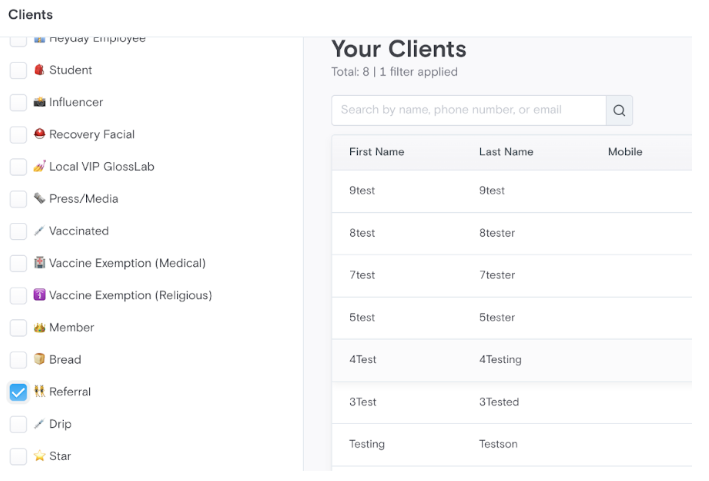
Additionally, Extole can update a loyalty users total points balance in BLVD as they earn and redeem points.
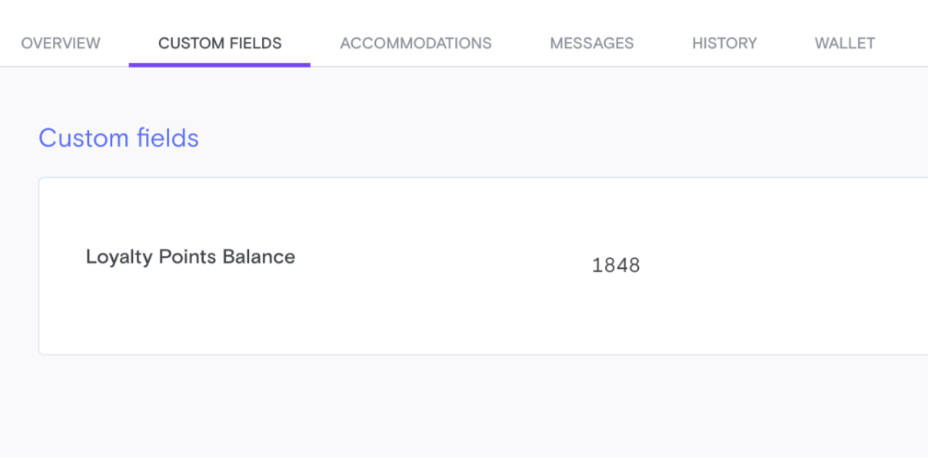
First, create a custom field in your BLVD dashboard and name it Loyalty Points Balance. Extole will then query BLVD's API to locate the key for the custom field.
From there, Extole will fire a real-time mutation to update the users points balance using https://dashboard.boulevard.io/api/2020-01/admin
mutation {
  updateClient(
    input: {
      id: "urn:blvd:Client:11111111-2222-3333-4444-555555555555"
      customFields: [
        {
          key: "dashboardField-aaaaaaaa-bbbb-cccc-dddd-eeeeeeeeeeee"
          textValue: "12345"
        }
      ]
    }
  ) {
    client {
      id
    }
  }
}
Updated 2 months ago