Iterable is the AI-powered cross-channel communication platform helping to orchestrate individualized, harmonized, and dynamic customer experiences by closing the activation gap.
An integration between Extole and Iterable offers you seamless data transfer between your referral and engagement programs and cross-channel marketing campaigns. By leveraging Extole program data, you can create targeted and personalized messaging that resonates with customers, understand the impact of your referral and engagement promotions in Iterable, and grow your marketing list, resulting in deeper insights and optimization of your cross-channel marketing campaigns.
An Iterable account is required in order to take advantage of this integration.
Iterable API Key
A server-side API key for making requests to Iterable. You can generate your API key in your Iterable Account.
User Identity
The unique identifier for a user in Iterable and Extole.For Email and Hybrid Iterable projects, the identifier will be email — the email address of the user.For User ID Iterable projects, the identifier will be user_id — your unique identifier of the user.Learn more about Iterable project types.
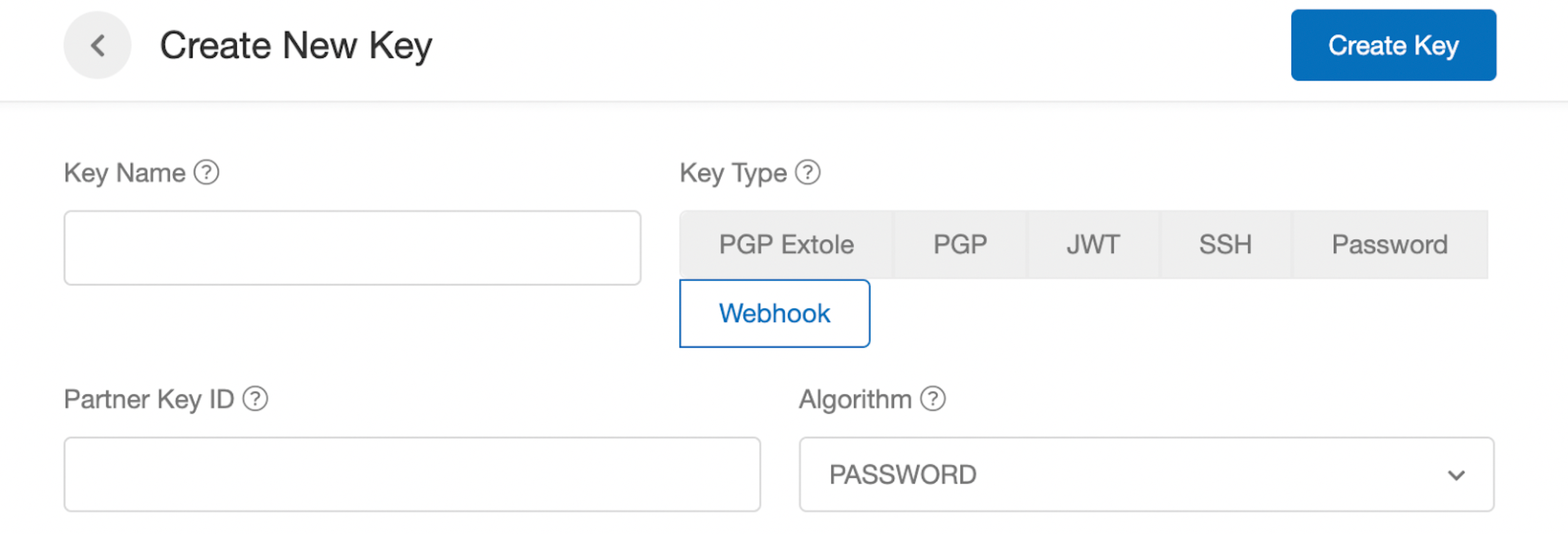
Store your Iterable REST API key as a webhook client key in Extole:
In My Extole, navigate to Security Center and find the Keys section.
Click + New Key.
Enter a Key Name. You’ll choose the key by this name when you create the webhook.
Select Webhook as the Key Type.
Set the Algorithm to PASSWORD.
Paste your Iterable REST API key into the key field.
Click Create Key.
The key appears in the Keys list, not in the outbound webhooks list.Iterable expects this key in the Api-Key header. Your Extole team will configure the webhook request to use that header when they set up the event mapping.
Use Case 1: Subscribe Users to Receive Marketing Communications
Whenever new or existing customers interact with your Extole-powered programs, they have the option to opt-in to receive further email marketing communications from you. Any time a customer checks this box and submits the form, Extole will track their opt-in status and can forward that status to an Iterable list. Alternatively, if customers decide not to opt-in to marketing emails in your Extole-powered campaigns, Extole can still create profiles for them in Iterable for future push or in-app messaging communication.Complete the following steps to send users from Extole to an Iterable list:
Create your static lists in Iterable. Extole strongly recommends creating separate lists by audience (advocate/friend) and marketing opt-in status (opted-in to email vs. not opted-in to email).
Copy the list ID from your newly created list (you’ll need to paste it into your My Extole account).
Log in to My Extole and navigate to Tech Center > Outbound Webhooks.
Click + New Webhook and fill out the necessary fields.
Work with your Extole CSM to create the request body. Here is where you will need to supply the list ID for the Iterable list you would like to send opt-ins to.
Repeat Steps 4–8 for each list.
Done! You can now set up Journeys in Iterable to subscribe opted-in participants to marketing communications or to trigger transactional messages.
A typical request body will look something like the following:
Use Case 2: Trigger Iterable Journeys Using Custom Events
Important NoteProgram-related emails will be sent from Extole by default and only participants who have previously opted in to SMS/push notifications will receive Iterable journey messages.
Extole events can provide valuable data for powering your Iterable journeys. For example, you could create a referral reward notification Journey to send an in-app, push, or SMS message when participant earns a reward in your Extole-powered programs.Additionally, when marketing your referral and engagement programs to customers in Iterable, you can use Extole Events as campaign conversion metrics to understand the number of shares and referrals an Iterable campaign drove.Complete the following steps to send Extole event data into your Iterable account:
Make sure you have event handling enabled in your Iterable account.
Work with your Extole team to decide which custom events you’d like to send into Iterable, or choose from our standard table below. Your Extole team will then set up a webhook that points to Iterable’s Events API and events will automatically start flowing into Iterable.
If you use Iterable’s EU Data Center, use https://api.eu.iterable.com/api/docs#events_track.
Each request to Iterable’s Events API identifies the person with email or userId and includes eventName, createdAt, and the relevant dataFields. Work with your Extole team to choose the events and fields you need in Iterable.Whoever builds the integration follows Build an Extole to Partner Integration for the controllers and webhooks, and uses Iterable’s Api-Key header and the request fields on this page.
Event
Example Properties
Extole Shared
email (required) user_id (required forUser ID project types) id (optional) first_name (optional) last_name (optional) share_link (optional)
Extole Signed Up
email (required) user_id (required forUser ID project types) id (optional) first_name (optional) last_name (optional)
Extole Converted
email (required) user_id (required forUser ID project types) id (optional) first_name (optional) last_name (optional)
Extole Advocate Reward Earned
email (required) user_id (required forUser ID project types) id (optional) first_name (optional) last_name (optional) coupon_code (optional) reward_face_value (optional) reward_face_value_type (optional)
Extole Reward Earned
email (required) user_id (required forUser ID project types) id (optional) first_name (optional) last_name (optional) coupon_code (optional) reward_face_value (optional) reward_face_value_type (optional)
A typical request body will look something like the following:
Use Case 3: Include a Customer’s Share Link or Code in Your Iterable Messages
Promoting your program has never been easier. With Extole and Iterable you can turn every customer into an advocate by including their personal share link in all of your Iterable communications. Extole will create the share link for the user and add it as an attribute to their Iterable profile.
Complete the following steps to generate and pass Extole share links to existing Iterable users:
To ensure that all current customers in Iterable have a share link, you can export a list of of customers from Iterable and securely upload them to Extole’s Batch Jobs center. Learn more about Extole’s file formatting standards and uploading files to Extole.
Your Extole CSM will then help you generate share links for each of the customers in the uploaded file.
Once the share links have been generated, your CSM can either help you run a report in the Extole platform and export the data to then be uploaded into Iterable or they can help you set up a webhook to update Iterable user profiles automatically.
Complete the following steps to generate and pass Extole share links to new Iterable users:
For all new customers, Extole can generate share links for every new customer and send them to Iterable to automatically update or create user profiles. To set this up, work with your Extole team to set up a webhook using Iterable’s Update User API. Note, if you are using Iterable’s EU Data Center, use https://api.eu.iterable.com/api/docs#users_updateUser.
Note: This connection identifies users in Extole and Iterable based on their email addresses.
Leverage any Iterable custom event to personalize the customer experience in your Extole-powered programs. Generate your Extole API key for Extole’s Events API and work with your Iterable CSM to set up your webhooks in Iterable.
Work with your Iterable CSM to start using Extole data in your Iterable campaigns. To debug this integration, you can use Extole’s Webhook Live View to view a live stream of triggered events and API responses.