
Overview
A manual reward is a reward you create yourself from a participant’s profile, outside your campaign’s normal rewarding logic. It is the right answer when someone earned a reward your campaign could not produce on its own, and the wrong answer when the reward already exists or when a reward the campaign already created only needs approving. Reach for a manual reward when:- A reward failed and cannot be approved, because the campaign was stopped, the reward was deleted, or required data is missing.
- The event that should have triggered the reward never reached Extole and cannot be recreated.
- An escalation needs a fast resolution.
- You have decided to reward someone outside your campaign’s normal criteria.
This page covers campaigns built with Flow Builder. Look for the flow icon next to the campaign name on the Campaigns page.In a Legacy campaign you issue the reward through the event it hangs off instead, by creating or approving that event. See How to Manually Create a Referral or other Event. If you aren’t sure which kind of campaign you have, ask your CSM.

A campaign built with Flow Builder carries the flow icon beside its name.
Decide Whether a Manual Reward Is the Right Fix
Work through these four checks in order. Each one can end the request with a cheaper and safer answer than a new reward.Step 1: Find Everyone the Request Names
Navigate to User Support > Person Search and look up every email address in the request. A referral involves two people, so look up both the advocate and the friend even when the request names only one of them. Open each profile. To see whether Extole has connected the two people, open View Network on the profile — it shows the relationships recorded for that person.Step 2: Check Whether the Reward Already Exists
Review the Rewards section of each profile, and for every reward you find, work out whether it’s the one being asked about.- Does it belong to this referral? Compare the related person on the reward against the other person named in the request. The two records often differ slightly — a nickname, a different email domain, a typo in an account ID — so a near match is usually the same person rather than a separate referral.
- Was it already delivered? The referral has been rewarded. Tell the requester so, and don’t issue a second reward.
- Did it fail, or is it still pending? Approve the existing reward instead of creating a new one. See How to Approve Failed Rewards.
- Did it go to the wrong address? That’s a delivery problem, not a missing reward. See Investigating Missing Rewards and Attribution for how to resend or recover it, including when the address needs to be changed. To send it again to the address already on the reward, see How to Resend a Reward. For a Tango gift that needs a corrected address, see How to Resend Tango Rewards.
Step 3: Look for the Event That Should Have Rewarded Them
If no reward exists, find out whether the qualifying event does. Open Show Steps on the profile and look for the event your campaign rewards — a conversion, a registration, an account opening, a funded account.- The event is there and pending. Approve it and your campaign issues the reward itself. Go to User Support > Approvals, click Approve, and record your own support ticket number in the note so the decision can be traced later.
- The event is there and failed or was declined. The approval window offers a Force approve checkbox for events that are low quality, declined, or still evaluating. A note is required, and Confirm stays disabled until you’ve entered one and ticked the box. Force approving overrides the quality result, so use it only when you’ve satisfied yourself the event is genuine.
- The event is there but has no Program, Campaign, or Journey. Extole received the event but couldn’t attach it to a referral journey, so no reward rule ever evaluated it. Follow Investigating Missing Rewards and Attribution.
- The event isn’t there at all. Confirm in your own systems that the action really happened, then create it. Prefer your campaign’s makegood event, which issues the reward while keeping the compensation out of your organic funnel data. See How to Manually Create a Referral or other Event.
Step 4: Confirm Before You Issue
Take your findings back to whoever raised the request and get their agreement before you create anything. Manual rewards are hard to unwind once the reward provider has delivered them. If the request came from one of your own customers and your findings don’t support a reward — the qualifying action never happened, or the referral was already rewarded — explain the outcome rather than issuing one anyway.Quick Reference
How to Issue a Manual Reward
Step 1: Open the Participant’s Profile
Navigate to User Support > Person Search, find the person, and open their profile. Scroll to the Rewards section and click + New Reward.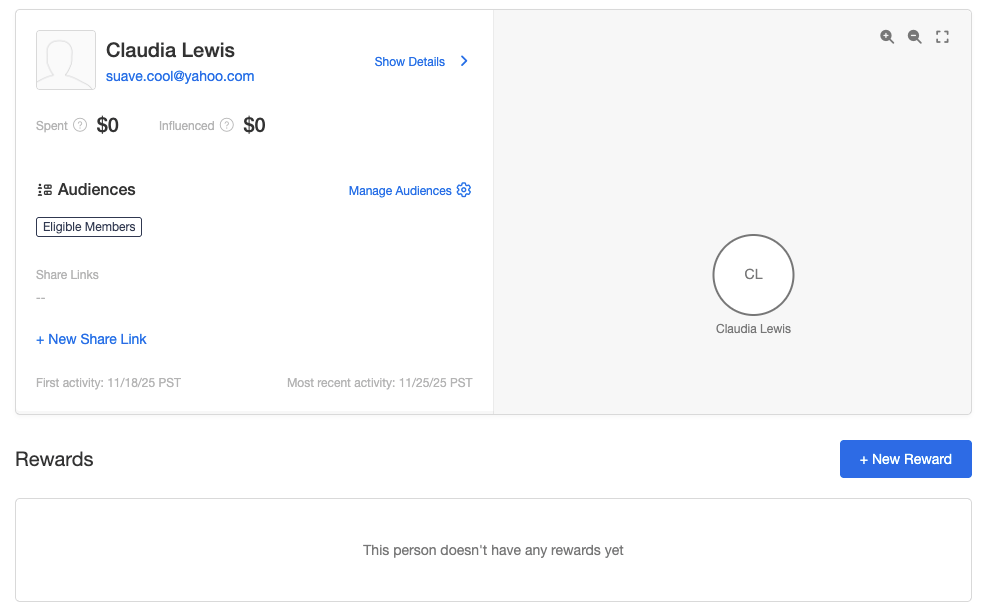
The Rewards section of a participant's profile, with the New Reward button.
Step 2: Select the Program, Campaign, and Reward
The New Reward panel opens with the person’s name and email at the top. Choose the Program, then the Campaign, then the Reward. Each selection narrows the next. Once a reward is selected, a link to its reward supplier appears beneath the field. Open it to confirm you’re about to issue the reward you meant to. Two things keep a reward out of reach here:- The campaign isn’t in the list. Only live, paused, and ended campaigns appear. A campaign that was never launched can’t be selected.
- The reward is greyed out. The reward is turned off, or it has no reward supplier set. Hover it to see which.
Step 3: Explain Why You’re Issuing It
In the Note field, record why this reward is being issued manually, including your own support ticket number. The note is saved with the reward. Example:Manual reward for ticket 48213. Original event missing first and last name. Eligibility verified.
Step 4: Add the Related Person
For a two-person program, enter the other person in the referral in Related Person — the friend when you’re rewarding the advocate, and the advocate when you’re rewarding the friend. Extole identifies them by whichever identifier your account is keyed on, usually their email address. Filling this in is what stops the same referral being rewarded twice later, and it’s what makes the reward report correctly as part of that referral.Step 5: Set the Optional Controls
The panel shows further controls depending on how the campaign and the reward are configured:- Create a relationship with this person: records a referral relationship between the two people where none exists yet.
- Record the business event that triggered this reward in dashboard data: includes the compensating event in your dashboard figures. Leave it off to keep a makegood out of your organic funnel data.
- Reward Date: the date the reward was earned, when it differs from today. It applies only to a force approved reward, and it can’t be in the future.
- Force approve this reward regardless of rule results: issues the reward even when the campaign’s rules fail. Leave it off to have Extole evaluate the rules and issue the reward only if they all pass — which is what you want when you still intend to honor reward caps and quality rules.
Step 6: Add Any Data the Reward Needs
Some rewards need extra data to be fulfilled or to report correctly, such as an order ID, an account number, or a shipping address. Add it in Additional Data as key and value pairs.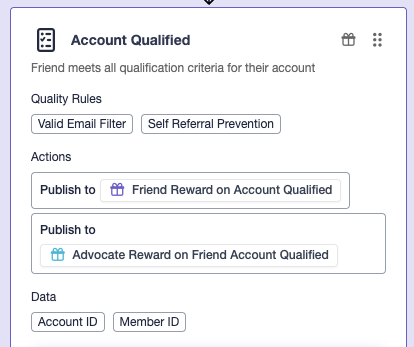
A Flow Builder step, showing the data the reward expects.
Step 7: Create the Reward
Review every field, then click Create. If any of the data the reward expects is still empty, a Missing data confirmation lists what’s absent. Go back and fill it in unless you’re certain the reward doesn’t need it, then click Create Anyway. The reward appears in the Rewards section of the profile and is issued if everything it needs is in place.Best Practices
- Investigate first. Run the four checks above before creating anything.
- Fill in everything you know. Related person and additional data are what make a manual reward deliver reliably and report accurately.
- Match your automatic rewards. A manual reward should look in reporting like one the campaign issued itself.
- Write a note someone else can use. Include the ticket number and what you verified.
- Reward both people separately. To reward the advocate and the friend for the same referral, repeat the process on each profile.
Troubleshooting
If a manual reward fails to create or fails to deliver, check that:- Your latest campaign changes have been published.
- The reward supplier has funds, or coupon inventory, available.
- The campaign is live, paused, or ended rather than never launched.
- The reward is turned on and has a reward supplier set.