
Overview
Extole employs a sophisticated, AI-powered tool to detect and prevent fraudulent activity from bad actors and broader gaming attempts on your programs.Risk Evaluation
In your Extole programs, we evaluate program participants who are eligible for a reward. The evaluation process involves machine learning models and takes into account the reputation of customer IP addresses, email addresses, shipping addresses, phone numbers, and devices. In particular, we look at each participant’s email address and IP address and assign them individual risk factor scores that inform an overall risk score. These risk scores translate to a simple numerical scale from 0 to 99. Lower scores on this scale equate to lower risk, while higher scores equate to higher risk.Risk Thresholds
We have thresholds set within Extole for each risk score based on our best practices so that program participants whose scores exceed the thresholds do not get rewarded. Our default thresholds are as follows:- Overall = 20
- IP Address = 20
- Is Email High Risk = False
Viewing Evaluation Results
You may want to view risk evaluation results in cases of “where is my reward” or WISMR inquiries from customers. If you’re investigating why someone did not get rewarded, you can view the results of a person’s risk evaluation in our User Support pages.- Look up the person and click into the rewardable event (e.g., signed up, account opened, converted, etc.) OR look up the event itself. Learn more about Leveraging User Support Pages.
- Once on the View Event page, you can find the scores in the Event History section, which contains information about the quality checks configured for the event.
- Find the check called “Maxmind” or “Ip/Email Based Anti Gaming” and expand it to see the scores.
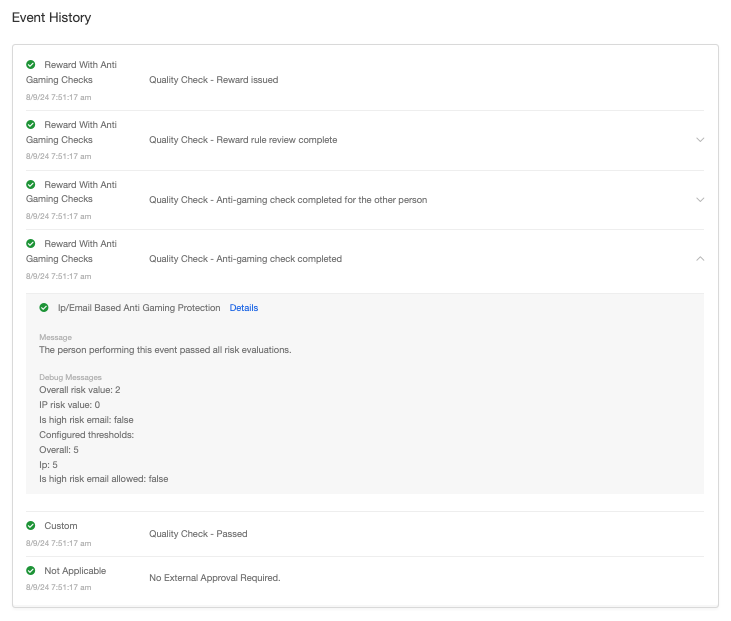
Rewarding High-Risk People
If you are fulfilling WISMR requests and would like to issue a reward to someone who failed their risk evaluation, please reference our article on How to Manually Create a Referral or Other Event or reach out to support@extole.com.Risk Evaluation When You Test a Program
Risk evaluation applies to your own test traffic as well as to real participants, and test traffic is unusually likely to exceed the thresholds. When you walk a new program end to end yourself, every test person shares one IP address — your office, your home, or your VPN — and the email addresses are often newly created or from a test domain. Both are inputs to the risk score. The result is a test that completes without issuing a reward. This is the expected outcome of the rules working, not a sign that the program is misconfigured, and the participant’s record tells the two apart:- Look the test person up in the User Support pages and open the reward.
- Read the rule results. When risk evaluation is what stopped the reward, every other rule passes and only the risk rule fails.
- In a referral program, check both sides. A two-person program evaluates the advocate and the friend separately, so either one can stop the advocate’s reward.