
Overview
We have asynchronous API endpoints to interact with your Extole reports. The three most essential endpoints can be used to run, check the status of, and download reports.Generate an Access Token
To get started, you’ll first need to get an access token. This will authorize you to make calls to our APIs. To generate a long-lived access token, follow our documentation on Generating Long-Lived Access Tokens.Get a Report
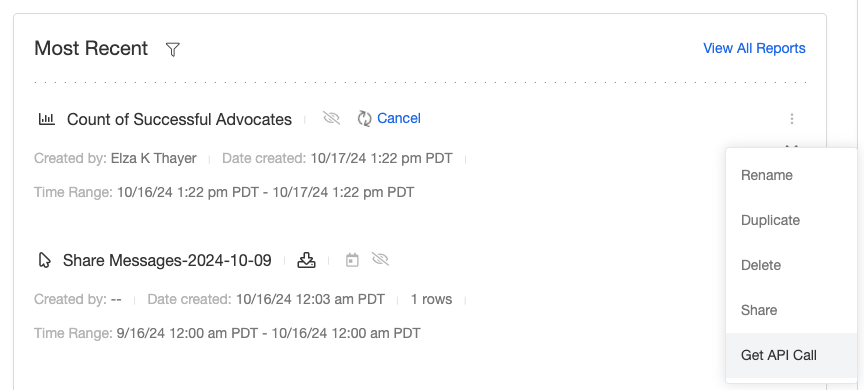
Different reports require different parameters. To find out exactly how your API call should look, first go to Reports in My Extole and run the report. Once the report is running or complete, you have two options to get the correct API call.- Open the kebab menu to the right of the report listing and select the option to Get API Call.
- Click into the report and and hit the button to Get API Call in the top right.

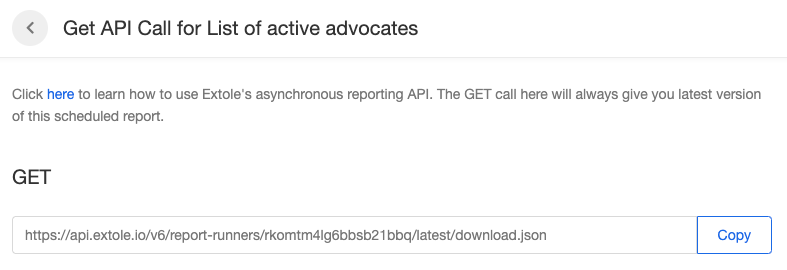
Get Scheduled Reports
For scheduled reports, the Get API Call button on the schedules page will give you the latest version of the scheduled report.
Successful GET Output
There are 2 endpoints that can be used for getting report information. /{report_id} and /{report_id}/download. The first of which will return a body similar to:
JSON
{report_id}/download will allow you to download the contents of the report. For scheduled reports, you can always download the latest version of the report with /{report_id}/latest/download. The API call will return the contents of the report in the format specified by the extension:
Execute a Report
To run a report via API call, follow the instructions below.- Make a POST call to our reports endpoint.
- Include these HTTP Headers:
- Include this body with your values filled in:
| Parameter | Value |
|---|---|
| <REPORT_NAME> | The name of the report you want to download. |
| <FORMAT> | JSON, CSV |
| <DATE_RANGE.START> | Any start date for the report range in the format YYYY-MM-DD. |
| <DATE_RANGE.END> | Any end date for the report range in the format YYYY-MM-DD. |
Check the Status of a Report
There are four options for the status of the report.- Pending: The report is preparing to run.
- In progress: The report is initialized and in progress. Depending on the amount of data you pull back, reports typically remain in this status for one to ten minutes.
- Failed: There was an error in the API call.
- Done: The report is complete and ready to be downloaded.
IN_PROGRESS with a null error_code has not failed, even when the report page in My Extole still shows it generating. Compare the record’s created_date with the time you submitted it: a report submitted a few minutes ago is still queued. A failed run carries EXECUTION_ERROR or CONFIGURATION_ERROR in error_code.
To get a report’s status, simply make the GET call listed on the report’s Get API Call page and look for the status parameter in the response.
Download a Report
Once the status of a report isDONE you will be able to download your report. You can do so by making the following GET call.
formats field of GET /v4/reports/<REPORT_ID>. They are chosen when the report is submitted and cannot be changed afterwards. A format query parameter on the download call does not convert the file: the run’s own format comes back whatever you ask for, so read the Content-Type header and the filename in Content-Disposition and parse what arrived.
A paginated download, download?limit=<N>, is the preview that My Extole shows on the report page. It is available for the text formats only: CSV, PSV, JSON, JSONL, and the headless CSV and PSV variants. For an XLSX run the paginated call returns 400 report_preview_not_available while the plain download succeeds, and My Extole shows Report preview for requested format is not available. Only the on-screen table is missing; the file is whole.
Time Ranges
Read a report’speriod_start and period_end from the record rather than assuming what a named range covers:
LAST_DAYis the trailing 24 hours from the time the report ran.PREVIOUS_DAYis the previous calendar day.ALL_TIMEstarts at your account’s own data start, not at the report type’s. Check that the window covers the whole life of the record before you read a count as a lifetime total.- Aggregate reports, such as the campaign and program summaries, lag the raw event reports by minutes to hours. When two windows over an aggregate disagree with a raw event count, the raw count is current.
Filters That Drop Every Row
A report whosefilters expression names a column that its mappings no longer define drops every row and still completes with status: DONE and a null error_code. The runner, the report status, and any SFTP delivery all report success, and an empty file is delivered. When a scheduled report stops returning rows, compare the failing run’s parameters with the last run that had rows before you look anywhere else. A renamed mapping also changes the CSV header, because the header is the mapping’s own identifier, so restoring the original name is usually the better fix.
Pattern parameters, and the like operator in mappings and filters, match the whole value rather than searching within it. See Custom Data Queries.