Overview
With the Extole and BHN integration, you can drive customer acquisition, generate brand advocacy, and build long-term loyalty with your customers. This powerful integration automates reward fulfillment with real-time reward delivery and offers a wide variety of reward options from Virtual Prepaid Cards to Physical Reloadable Cards for your referral and engagement programs.Prerequisites
Available Products
Virtual Prepaid Cards
Virtual Prepaid Cards are a great contactless payment option when you need something fast. They can be used for online and phone purchases anywhere Debit Mastercard and Visa Debit Cards are accepted.Virtual Prepaid Mastercard cards can also be added to popular mobile wallets like Apple Pay, Samsung Pay, and Google Pay.Physical Reloadable Prepaid Cards
Reloadable prepaid cards are ideal for companies who want to reward their recipients multiple times throughout the year. They can be used to incentivize program participation by creating cards specific to certain categories, like health and wellness. Additionally, they can be personalized with a company logo and a recognition message to strengthen relationships.Virtual Closed Loop (eGift Cards) & Tango Rewards (Reward Link & Disbursement Link)
BHN’s virtual closed loop in addition to Tango’s Disbursement (Card Transfer, ACH, PayPal) & Reward Link solutions offer fast, flexible reward delivery for any audience. Choose from eGift cards from popular merchants (Target, Amazon, etc.) or curate digital gift card experiences that can be personalized and branded. These solutions make it easy to drive engagement, loyalty, or compensation at scale, with global reach and real-time delivery.Compatible with Reward Bank
BHN card products can also be used within Extole’s Reward Bank. Reward Bank gives your advocates a single place to collect and redeem multiple referral rewards. Learn more about Reward Bank.Integration Model
BHN is an Extole to Partner reward fulfillment integration: Extole orders cards from BHN when a program participant earns a reward, and BHN’s response moves that reward to fulfilled or failed. BHN sends no activity into Extole, so the integration carries no business events. Each card product is a reward supplier that you install when you create a reward, and you install one per reward you offer. The integration supplies four of them — virtual prepaid cards, physical single-load prepaid cards, physical reloadable prepaid cards, and eGift cards — and each carries its own value, client program number, financial account, and payment type. Extole calls five Hawk Marketplace endpoints, all onhttps://api.blackhawknetwork.com:
Order calls are retried over a few hours. The status check runs on a much longer schedule, escalating out to roughly a month, because physical cards are manufactured and mailed rather than delivered instantly.
The first reloadable order uses
submitOpenLoopPersonalizedIndividual and arrives loaded. A later reward for the same person and client program number is not a second card: the request handler rewrites that call to submitFunding and funds the card already issued. That rewrite is part of the maintained integration, not an extra webhook.
Reward Connection Contract
The integration component is namedbhn. Its type is the current integration-v10 revision (integration-v10.1 on the maintained source). It carries tags internal:type:integration, internal:integration-component-name:bhn, and internal:self-managed. The campaign program label is bhn; the support campaign’s is bhn-v10-support.
Both credentials sit on that component under these setting names — handlers and webhook client_key_id expressions read them, so a prefixed name such as bhnMerchantId is a different setting and leaves every order unauthenticated or unaddressed:
Create five
REWARD webhooks, one for each endpoint above, attached to the bhn component. Each order webhook filters to its matching supplier variant and to EARNED, uses POST, and has retry intervals [1800, 3600, 10800]. The status webhook filters to all four BHN supplier variants and to FULFILL_FAILED; its default_method is POST and the request handler overrides the call to GET. Its retry intervals are:
internal:bhn-virtual, internal:bhn-physical-single-load, internal:bhn-physical-reloadable, and internal:bhn-egift-card. Template names use the same tokens without the internal: prefix. Webhook names on the maintained source are bhn_v10_virtual_prepaid_cards, bhn_v10_physical_single_load, bhn_v10_physical_reloadable, bhn_v10_egift, and bhn_v10_check_order_status.
Every webhook client_key_id is javascript@buildtime:context.getVariableContext().get("clientKeyId"). Enable the webhooks once that setting and merchantId are populated; a default empty request builder is not a finished handler.
Order and status handlers
These are the maintained v10 handlers. Write them; do not leaverequest as createRequestBuilderWithDefaults().build() or response_handler null.
Each order request uses context.createRequestBuilder() (not the defaults builder) and these headers:
The JSON body always carries
clientProgramNumber, paymentType, and orderDetails[0] with clientRefId (the reward id), recipient, and amount (reward.getFaceValue()). financialAccountId is included when the supplier data map has one. Recipient firstName / lastName are whitespace-collapsed and have quotes stripped.
The shared order response handler parses the BHN JSON. On HTTP 4xx or
responseBody.errors, it sends createFailedRewardCommandEventBuilder() unless the first error code is orderDetails.recipient.id.doesNotExist, which returns "RETRY". HTTP 5xx returns "RETRY". A 2xx without errors sends createFulfillRewardCommandEventBuilder().withSuccess(false) — that marks the reward as processing, not delivered — and returns "OK".
The status request uses context.createLegacyRequestBuilderWithDefaults(), sets method GET, headers merchantId and requestId ("S" + rewardId + "_" + attemptCount), and URL {webhookUrl}?requestId={rewardId}&clientProgramNumber={clientProgramNumber}.
The status response handler treats orderStatus values Complete, Funding Posted, and Shipped as completed: createFulfillRewardCommandEventBuilder().withSuccess(true).withPartnerRewardId(orderNumber). responseBody.errors fails the reward immediately. Any other orderStatus — including Cancelled, Declined, Error, Failure, the funding-hold statuses, In Process, and Successfully Sent To Processor — or HTTP 5xx returns "RETRY" until the configured retry count is exhausted, then fails the reward.
Map BHN Order Statuses
The status webhook readsorderStatus from BHN’s Order Status Reference. The maintained completed set is Complete, Funding Posted, and Shipped. Funding Posted is included because the order webhook already marked the reward as processing with withSuccess(false); the status check is what closes it.
The views socket accepts
config-view-v10.0, report-runner-view-v10.0, and event-stream-view-v10.0, and is tagged internal:view. Configuration’s settingsToDisplay is merchantId and clientKeyId.
The integration carries four tabs, and all four are part of the shape rather than optional extras:
The integration’s registered image key is
blackhawkNetwork, and it is not derived from the partner’s name or this page’s slug. The image key feeds the partner detail view; the tile on the Integrations page comes from the logo setting instead, and BHN’s artwork is already published on the registered bhn component for both the integration and its four reward products.
Only the v10 integration is current. Build or install that one; the earlier flavor is not a fallback when something in the v10 shape is inconvenient.
Reward Activity Report Contract
The Reward Activity tab owns one enabled, scheduled report runner. Its account-local report type is namedReward Revenue; find that name through GET /v6/report-types?display_name=Reward%20Revenue, and use the returned identifier rather than carrying an identifier from another account. Confirm the selected type declares locales, include_totals, and a metric-shaped mappings parameter. If this account has no type by that name, create a configured type from a parent that accepts metric mappings, with the defaults below, before creating the runner.
Its parameters are part of the product contract:
reportColumnsMapping must use the date, count, and revenue columns this mapping emits.
Integration
Complete the following steps to quickly get your integration up and running. Your Extole and BHN teams will support you through this process and answer any questions you may have.Enable the BHN Integration
Your Extole team will help you with this process.- Select the BHN integration on the Partners center of your My Extole account.
- Within the BHN integration, hit the Install button to initiate the connection between Extole and BNH.
- Several required fields will appear where you’ll need to provide information such as the Merchant ID and Client Key ID. Your Merchant ID is a unique identifier, provided by your BHN team, that identifies your business within their system. The Client Key ID will be configured by your Extole team.
- Complete the connection by applying the changes.
Set up the BHN Reward Supplier from your Rewards page
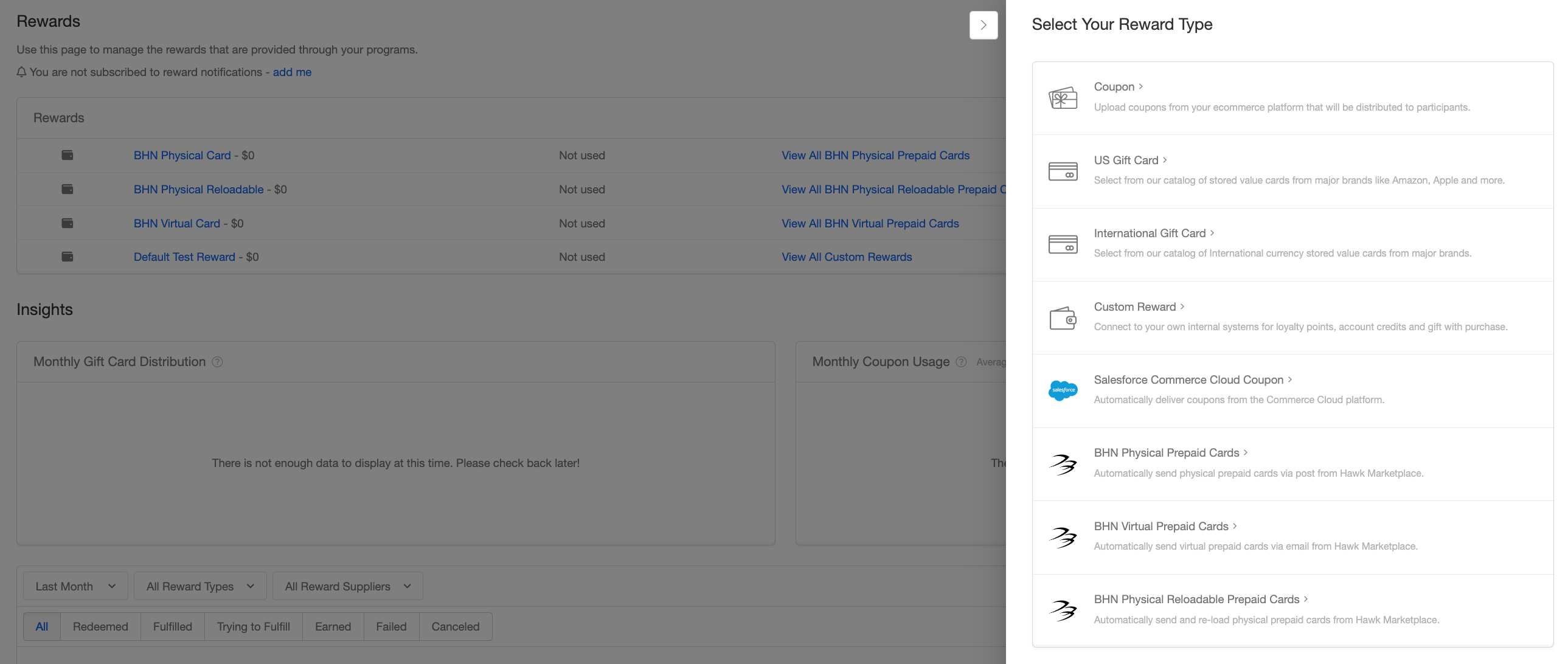
- Go to Rewards page in your My Extole account and hit + New Reward.
- Select the BHN product that matches what you are offering: BHN Virtual Prepaid Cards, BHN Physical Single-Load Prepaid Cards, BHN Physical Reloadable Prepaid Cards, or BHN eGift Cards. Virtual and eGift are emailed; physical single-load and physical reloadable are mailed, and only reloadable cards can receive later value on the same card.
- Specify the name of the reward, the value of the reward, and the Client Program Number and FAID (optional) supplied by your BHN team. You can also get your program number and FAID from the Hawk Marketplace Portal.
- Select the appropriate Payment Type. Confirm your preferred payment method (ACH Debit or Drawdown) and complete the necessary documentation for setup. This step can be confirmed with your BHN team.
- Save the configuration and use the newly created reward. For a reloadable card, the first reward issues the card; later rewards for the same person and Client Program Number fund that card through BHN’s
submitFundingpath rather than creating a second card.
FAQs
How can I understand the status of a reward in the Extole platform?
Extole leverages HTTP status codes from BHN API responses to update the status of a card order (aka reward) in the Extole platform. You can use the Extole platform to understand if a reward has been submitted to BHN, if it’s been processed and sent to the recipient, or if the reward failed. Refer to the table below for additional information on reward stages in the Extole platform.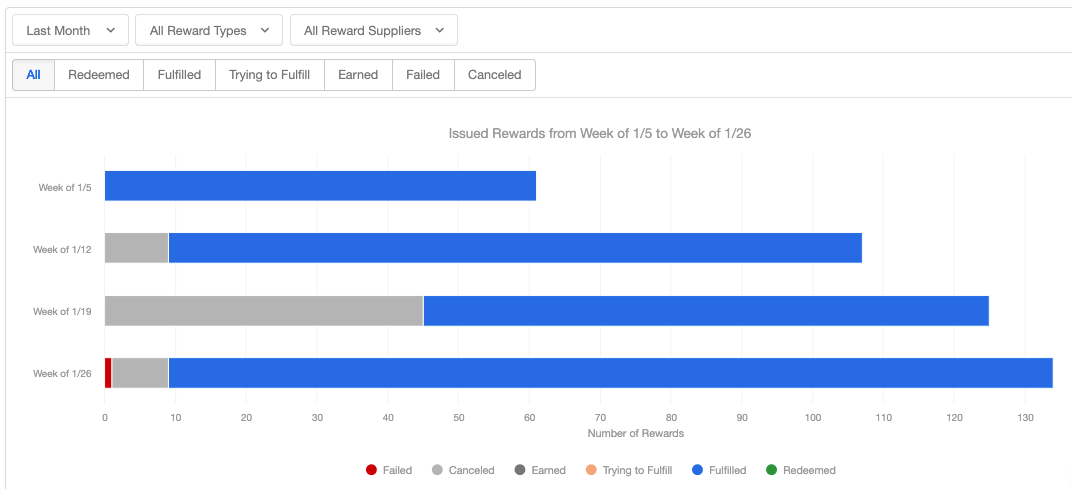
| Reward State in Extole | Definition |
|---|---|
EARNED | Extole has submitted a card order to BHN and is waiting on confirmation from BHN whether the order has been processed or has failed. |
TRYING TO FULFILL | BHN has responded to Extole’s order request and is processing the card order.-Physical Prepaid Single Load cards take up to 2-3 business days to process.-Physical Prepaid Re-Loadable Cards take up to 2-3 business days to process the initial card order, and then 24 hours for any subsequent re-loads.-Digital Prepaid Single Load Cards take up to 24 hours to process. |
SENT/ FULFILLED | BHN has successfully processed the order and has sent the card to the recipient via email/post. Physical cards take an additional 7-10 business days to arrive in the mail. |
FAILED | BHN was not able to process the order, either due to an improperly formatted request (400), a duplicate request ID (409), or a system error (500).Extole’s monitoring system will automatically detect failures and triage them into tickets for resolution via the Extole support team. In the case of a 409 (duplicate request ID), Extole Support may re-send the request to BHN with an updated request ID. In the case of a 400 or 500, Extole will reach out to the BHN account manager to cancel the reward and then submit a new order to BHN for processing. |
CANCELED/REVOKED | An order has been manually canceled or revoked inside of the Extole platform. This is a manual operation done by the Extole customer support team. Any order canceled in the Extole platform also to be canceled in the BHN Program Modeler patform. |
How do I send a card to a corrected email address?
BHN does not support resending an already-issued card order to a different email address. Extole’s Resend action delivers to the address already on the reward and does not change its destination, so updating the person’s email in Extole and then clicking Resend does not redirect a card BHN has already sent. See How to Resend a Reward. This holds whether the original address was a typo or the recipient has since lost access to that mailbox. TheSENT state means BHN emailed the card to the address on the order; it does not tell you whether the recipient has used it, and used cards cannot be reversed.
Contact support@extole.com rather than issuing a second reward. Include:
- The reward’s
Partner ID, which is the BHN order number on the Reward event. - The incorrect email address and the correct one.
- Whether both addresses already have person profiles in Extole, and what you want done with the incorrect profile.
How do I cancel a reward?
By default rewards that are in anEARNED, TRYING TO FULFILL, or SENT/FULFILLED state have either already been delivered to the recipient or are in processing and cannot be canceled inside of the Extole platform. In some cases, you may be able to manually intervene in the BHN platform and attempt to reverse the reward if the recipient has not redeemed the card yet. Please read the following steps to attempt to reverse the reward order in BHN’s Program Modeler:
-
Look up the order number for the reward in the Extole platform. The Order number is the
Partner IDlocated on the Reward event.
- Log in to BHN’s program modeler and look up the order number to see if it can reversed. For reloadable cards, reversals must be submitted within the 10‑day window of ordering. For single‑load cards, the card must be unused and at least 30 days prior to expiration.
-
Once you’ve reversed the reward, navigate back to the Reward in the Extole system and select
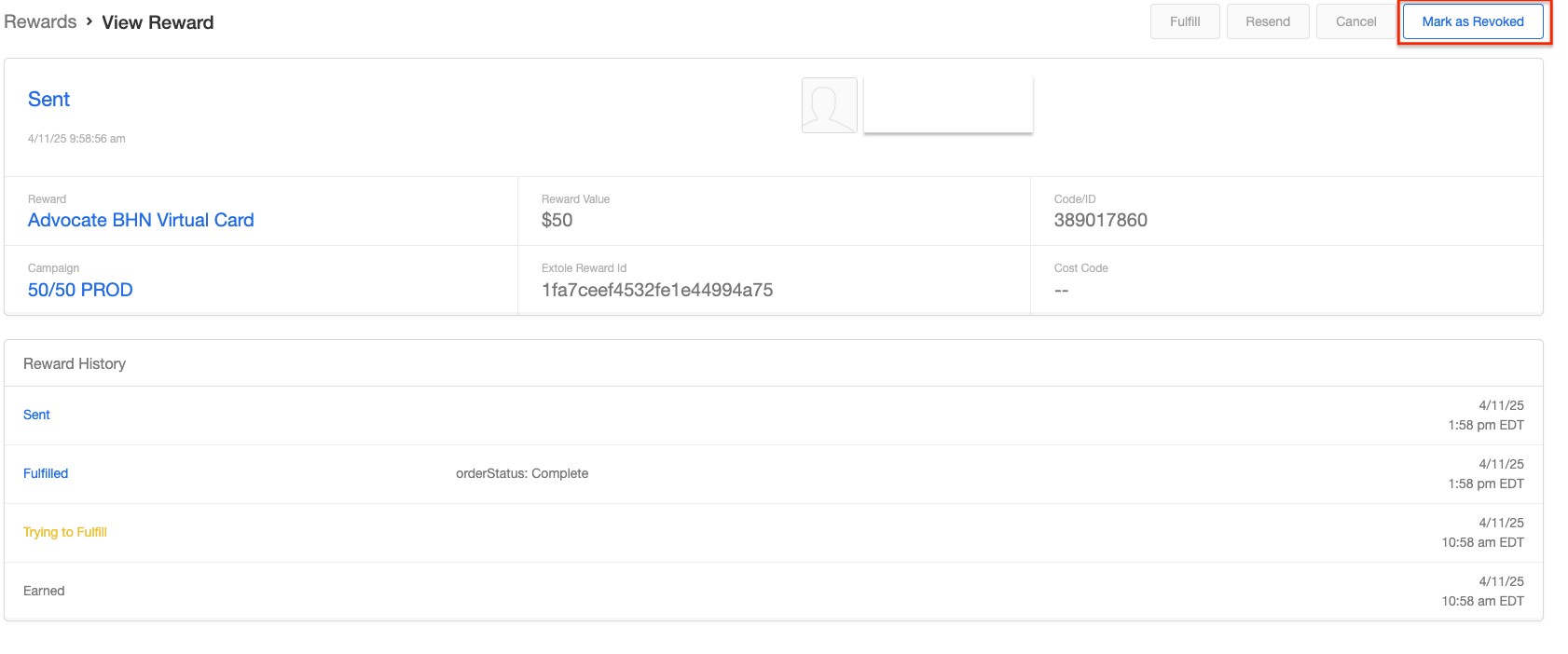
Mark as Revokedif the reward had already been fulfilled, orCANCELif it was in processing.