> ## Documentation Index
> Fetch the complete documentation index at: https://docs.extole.com/llms.txt
> Use this file to discover all available pages before exploring further.

# Braze

> Set up a connection between your Extole programs and Braze's customer-engagement platform.

## Overview

[//]: # "Does Extole integrate with Braze?"

Integrating Extole and Braze allows you to pull valuable customer insights from your Extole programs into Braze, empowering you to create more personalized marketing campaigns that boost customer acquisition, engagement, and loyalty. You can also dynamically pull Extole content attributes, such as personalized share codes and links, into Braze communications to turn every customer into a brand advocate.

[Learn more about Braze](https://www.braze.com/)

## Integration Model

Braze is an outbound integration: Extole forwards program activity to Braze, and Braze sends nothing back. It installs from a maintained library source and is then configured for your Braze account.

| Extole call      | Braze endpoint            | Purpose                                              |
| :--------------- | :------------------------ | :--------------------------------------------------- |
| Event tracking   | `/users/track`            | Custom events, event properties, and user attributes |
| Campaign trigger | `/campaigns/trigger/send` | API-triggered campaign and Canvas sends              |

Extole calls both endpoints, so a finished Braze integration owns two outbound connections. Both use your Braze instance URL and authenticate with your Braze REST API key, stored in Extole as a webhook client key.

The two values arrive on different schedules. The Braze API URL has to hold a valid instance host before the integration can be published, so it keeps a placeholder until you supply yours. The REST API key can stay empty until you are ready; nothing reaches Braze without it.

The finished integration forwards exactly three kinds of activity out of the box: share-link creation, subscription, and unsubscription. Any other Extole event — outcomes, shares, reward states — reaches Braze only after you add it during setup, so an installation that already forwards them is sending more than this integration defines.

Program campaigns attach Braze data items to their own events, so the integration also provides a reusable Braze data item for them to use, and it exposes each outbound connection as a setting rather than as a raw webhook reference. A Braze action added to a program that way keeps working after the integration is rebuilt.

For the platform build sequence — installing the library source, reshaping it, attaching webhooks, and verifying the result — see [Integration Categories](/technical/building-custom-integrations/integration-types/integration-categories), [Build an Outbound Library Integration](/technical/building-custom-integrations/integration-types/integration-build-outbound), and [Create the Integration Campaign and Component Model](/technical/building-custom-integrations/integration-lifecycle/integration-component-model).

[//]: ___

## Prerequisites

[//]: # "What are the requirements for integrating Extole with Braze?"

The table below lists the prerequisites you need to complete this partnership integration.

| Requirement        | Description                                                                                                                                                                                                                                                                                                                                                                                                                                                                                  |
| :----------------- | :------------------------------------------------------------------------------------------------------------------------------------------------------------------------------------------------------------------------------------------------------------------------------------------------------------------------------------------------------------------------------------------------------------------------------------------------------------------------------------------- |
| Braze Account      | A Braze account is required in order to take advantage of this partnership.                                                                                                                                                                                                                                                                                                                                                                                                                  |
| Braze REST API Key | A Braze REST API key with both the `users.track` and `campaigns.trigger.send` permissions, created within your Braze **Settings** > **REST API Key** > **Create New API Key**. Extole calls both endpoints, and a key missing either permission is rejected with `403 Access Denied` on the calls it does not cover. Braze does not allow a key's permissions to be edited after it is created, so a key that already exists with only `users.track` has to be replaced rather than amended. |
| Braze API URL      | Your Braze API URL is specific to your Braze Instance. You can find it [in Braze's API documentation](https://www.braze.com/docs/api/basics/#endpoints).                                                                                                                                                                                                                                                                                                                                     |

[//]: ___

## Use Cases

[//]: # "How can I leverage the Extole integration with Braze?"

The following use cases showcase a few ways you can leverage Extole’s integration with Braze. Work with your Extole implementation and customer success managers to develop an option that fits your company’s specific needs.

* Leverage custom events from your referral and engagement programs to trigger a Braze campaign or Canvas
* Create custom segments, dashboards, and reporting using data from your Extole-powered programs
* Automatically unsubscribe or subscribe users to your marketing list in Braze

[//]: ___

## Integration

Complete the following steps to quickly get your integration up and running. Your Extole implementation and customer success managers will support you through this process and answer any questions you may have.

### Create a Key in Extole

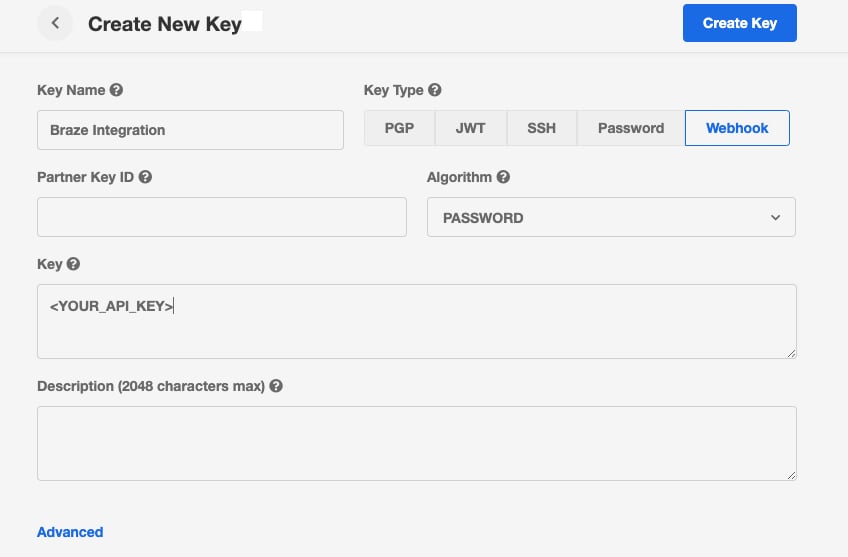
In your My Extole account, go to the Security Center and complete the following steps.

Create a new key by clicking the + New Key button.\
Provide the necessary information for the key:

Key Name = Braze Integration\
Key Type = Webhook\
Partner Key ID = N/A\
Algorithm = password\
Key = Your Braze Rest API Key

Save the key.

<img src="https://mintcdn.com/extole/jL8qwWMZhH32a7N8/images/extole/57a3fd1239df52c006b882f6a01b50f4e4073f286f75b1eb915dbb75c220b003.png?fit=max&auto=format&n=jL8qwWMZhH32a7N8&q=85&s=bfb0b622b2f820ca288f8ba10c58758d" alt="The My Extole Security Center form for creating a webhook key named Braze Integration" width="848" height="557" data-path="images/extole/57a3fd1239df52c006b882f6a01b50f4e4073f286f75b1eb915dbb75c220b003.png" />

### Connect to Your Braze Account

1. Select the Braze integration on the [Partners](https://my.extole.com/partners) page of your My Extole account.
2. Within the Braze integration, hit the Install button to initiate the connection between Extole and Braze.
3. Fill out the required fields, starting with the Braze REST API key. Create it in your Braze account under **Settings** > **REST API Key** > **Create New API Key**, and select both the `users.track` and `campaigns.trigger.send` options. Extole uses `users.track` to record events and attributes and `campaigns.trigger.send` to trigger campaigns and Canvases, so a key with only the first authorizes half the integration. Select both at creation: Braze does not let you add a permission to an existing key.
4. Enter your Braze API URL. This URL depends on which instance your Braze account is provisioned to. You can find it [in Braze's API documentation](https://www.braze.com/docs/api/basics/#endpoints).
5. Add any additional Extole events you'd like to send to Braze beyond the defaults. The default events, event properties, and user attributes are described in the [Extole Events table](https://docs.extole.com/docs/braze#extole-program-events) below.
6. Add any additional Reward states you'd like to send to Braze beyond the default `FULFILLED` state. Refer to the [Extole Rewards table](https://docs.extole.com/docs/braze#extole-rewards) below for a description of all available reward states.
7. Select your Braze External ID key mapping, which is how Extole updates user profiles in Braze. You can map the Braze External ID key to Extole's`email_address`or `partner_user_id`for the user.
8. Complete the connection by saving your settings. Once this is done, Extole events will be able to flow into your Braze account.

### Extole Program Events

Below are the default events, event properties, and user attributes Extole will send into Braze. In addition to the default events listed here, you can add any other Extole events to your integration. Please work with your Extole Implementation or Customer Success Manager to identify and add any additional events you would like to send to Braze.

<table>
  <thead>
    <tr>
      <th>
        Event Name
      </th>

      <th>
        Event Definition
      </th>

      <th>
        Event Properties
      </th>

      <th>
        User Attributes
      </th>
    </tr>
  </thead>

  <tbody>
    <tr>
      <td>
        `extole_share_link_created`
      </td>

      <td>
        A participant creates their share link by entering their email in the Extole Share Experience.
      </td>

      <td>
        Email\
        Funnel (advocate or friend)\
        Program
      </td>

      <td>
        Email\
        External ID\
        Share link
      </td>
    </tr>

    <tr>
      <td>
        `extole_shared`
      </td>

      <td>
        A participant shares their referral link with a friend.
      </td>

      <td>
        Email\
        Funnel (advocate or friend)\
        Program\
        Share channel
      </td>

      <td>
        Email\
        First name\
        Last name
      </td>
    </tr>

    <tr>
      <td>
        `extole_outcome` - The outcome is dynamic based on the configuration of your program (e.g., `extole_shipped`, `extole_converted`, etc.)
      </td>

      <td>
        A participant has converted or completed the desired outcome event configured for the program.
      </td>

      <td>
        Dynamic per program
      </td>

      <td>
        Email\
        First name\
        Last name
      </td>
    </tr>
  </tbody>
</table>

### Extole Subscription States

Below are the default subscription states Extole will send into Braze.

<table>
  <thead>
    <tr>
      <th>
        State
      </th>

      <th>
        Definition
      </th>

      <th>
        Data
      </th>

      <th>
        User Attributes
      </th>
    </tr>
  </thead>

  <tbody>
    <tr>
      <td>
        `subscribed`
      </td>

      <td>
        A participant has opted-in to receive marketing messages.
      </td>

      <td>
        NA
      </td>

      <td>
        Email\
        List type\
        External ID\
        Email subscribe (opted in)
      </td>
    </tr>

    <tr>
      <td>
        `unsubscribed`
      </td>

      <td>
        A participant has opted-out of receiving Extole email communications.
      </td>

      <td>
        Email\
        External ID\
        Subscription state (unsubscribed)\
        Subscription group ID
      </td>

      <td>
        List type
      </td>
    </tr>
  </tbody>
</table>

### Extole Rewards

By default, Extole will send reward events in the `FULFILLED` state to Braze so that you can trigger reward notifications via a Braze campaign or canvas. See the table below for additional reward states you may be interested in sending from Extole to Braze.

<table>
  <thead>
    <tr>
      <th>
        Reward State (Event Name)
      </th>

      <th>
        Definition
      </th>

      <th>
        Event Properties
      </th>

      <th>
        User Attributes
      </th>
    </tr>
  </thead>

  <tbody>
    <tr>
      <td>
        `FULFILLED` - Default
      </td>

      <td>
        The reward has been assigned a value (e.g., coupon, gift card, etc.) by an Extole reward supplier.
      </td>

      <td>
        Email\
        Face value\
        Coupon code\
        Face value type
      </td>

      <td>
        Email\
        First name\
        Last name
      </td>
    </tr>

    <tr>
      <td>
        `EARNED`
      </td>

      <td>
        A reward has been created and associated with a person.
      </td>

      <td>
        Email\
        Face value\
        Coupon code\
        Face value type
      </td>

      <td>
        Email\
        First name\
        Last name
      </td>
    </tr>

    <tr>
      <td>
        `SENT`
      </td>

      <td>
        The reward has been fulfilled and has been sent either via email or on a device to the recipient.
      </td>

      <td>
        Email\
        Face value\
        Coupon code\
        Face value type
      </td>

      <td>
        Email\
        First name\
        Last name
      </td>
    </tr>

    <tr>
      <td>
        `REDEEMED`
      </td>

      <td>
        The reward has been used by the recipient, as evidenced in a conversion or  redemption event sent to Extole.
      </td>

      <td>
        Email\
        Face value\
        Coupon code\
        Face value type
      </td>

      <td>
        Email\
        First name\
        Last name
      </td>
    </tr>

    <tr>
      <td>
        `FAILED`
      </td>

      <td>
        An issue has prevented the reward from being issued or sent, requiring attention.
      </td>

      <td>
        Email\
        Face value\
        Coupon code\
        Face value type
      </td>

      <td>
        Email\
        First name\
        Last name
      </td>
    </tr>

    <tr>
      <td>
        `CANCELED`
      </td>

      <td>
        The reward has been deactivated and will return to inventory.
      </td>

      <td>
        Email\
        Face value\
        Face value type
      </td>

      <td>
        Email\
        First name\
        Last name
      </td>
    </tr>

    <tr>
      <td>
        `REVOKED`
      </td>

      <td>
        The fulfilled reward has been invalidated. For example, Extole requested a gift card from a supplier and then subsequently determined that the card was sent in error. If the supplier supports revoking the reward, we would request the funds back and the reward would no longer be valid.
      </td>

      <td>
        Email\
        Face value\
        Face value type
      </td>

      <td>
        Email\
        First name\
        Last name
      </td>
    </tr>
  </tbody>
</table>

## Customization

### Find and Create Users in Braze

For certain use cases, such as a new email or SMS subscription where Extole does not have an external id (user id) for the user, Extole can check for the user's identifier using Braze's Export User by Identifier endpoint. If the user exists within Braze, Extole will add and update any profile attributes. If the request does not return a user profile, Extole will instead use the User Track endpoint to create a User Alias with the user's email address as the Alias Name.

## Using this Integration

[//]: # "How do I use the Extole integration with Braze?"

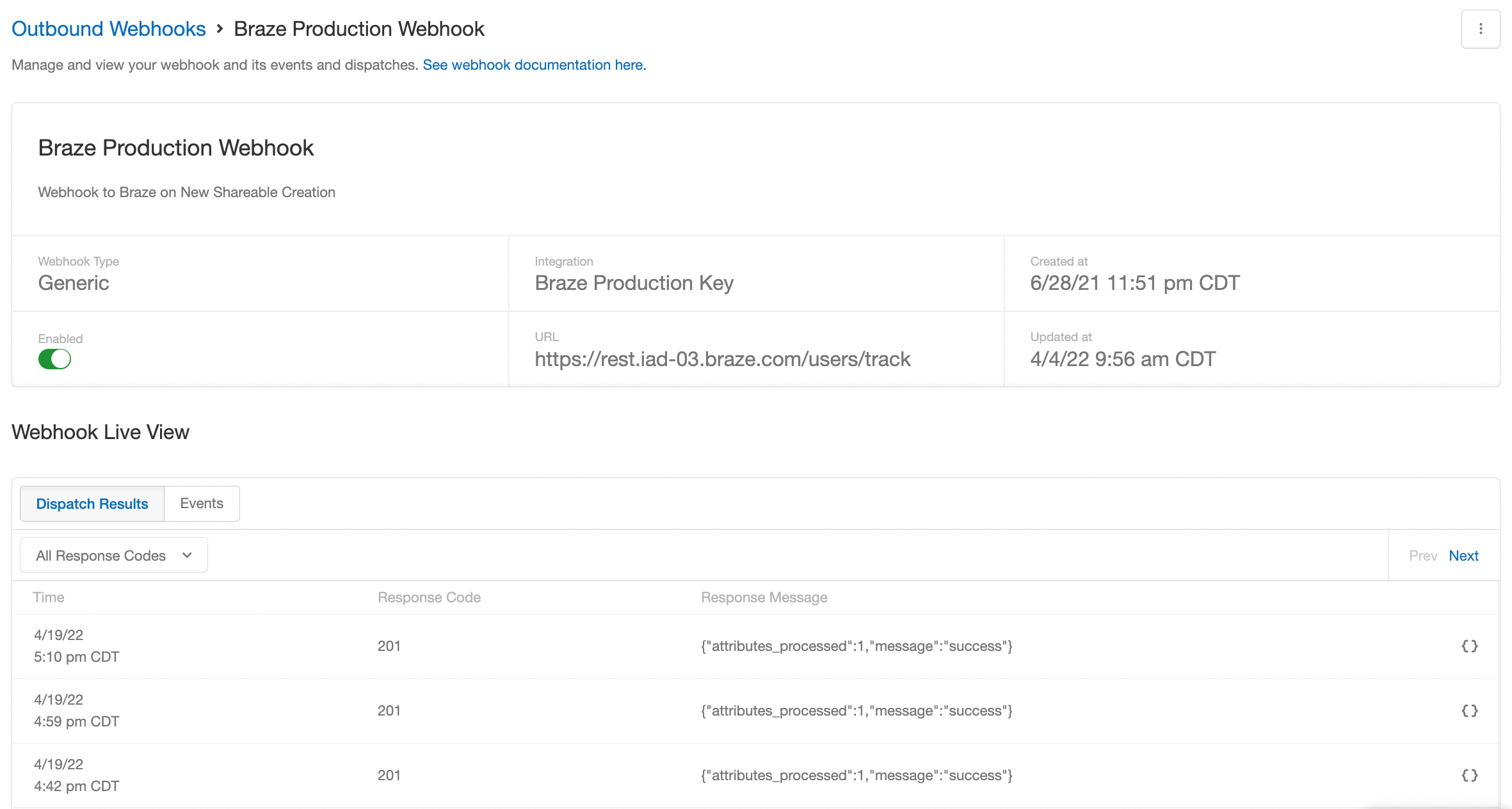
After connecting your accounts, events will automatically begin flowing from Extole to Braze without any action on your part. A live view of events being sent to Braze can be found in Extole’s Outbound Webhook Center for troubleshooting.

<img src="https://mintcdn.com/extole/qcEY2oecClXIoahB/images/extole/75255c747971ce4b2851ad50b958d2cb2566aa5f6eb5961043df404db2855a9f.png?fit=max&auto=format&n=qcEY2oecClXIoahB&q=85&s=c01d6c3aff19a25bd8cbbf4976413b27" alt="The Extole Outbound Webhook Center showing live events sent to Braze" width="2362" height="1264" data-path="images/extole/75255c747971ce4b2851ad50b958d2cb2566aa5f6eb5961043df404db2855a9f.png" />

[//]: ___