> ## Documentation Index
> Fetch the complete documentation index at: https://docs.extole.com/llms.txt
> Use this file to discover all available pages before exploring further.
# Member Experience
> What a loyalty member sees — enrollment and consent, how Extole recognizes them, the balance and redemption views, and the messages that bring them back.
## Overview
[//]: # "What do loyalty members see in an Extole program?"
A loyalty program only works if participants can see what they have earned and understand what it
is worth. This page covers what a member encounters, from enrollment through redemption.
[//]: ___
## Enrollment and Consent
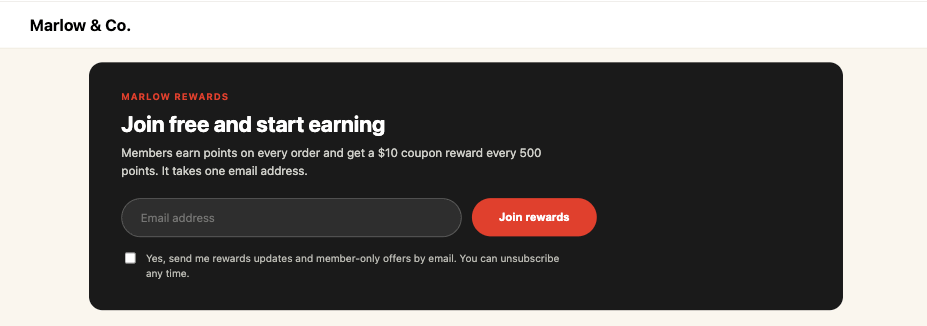
Participants join through an experience you brand and place where it makes sense — an account page,
a landing page, or an in-app screen. Enrollment can also come from your side, by adding participants
to an audience you maintain and sync to Extole, or from the participant's own activity, by targeting
the program at an event that qualifies them — a purchase over \$500, for example. See
[How to Target a Program](/guides/flow-campaigns/how-to-target-a-program).
Treat enrollment and marketing consent as separate decisions. Joining a loyalty program is not by
itself consent to receive marketing email or SMS, and where you capture both, record them
separately. Extole can sync opt-in and opt-out state with your other systems; see the
[Extole Opt-In and Opt-Out Sync Guide](/guides/platform-overview/extole-opt-in-opt-out-sync-guide).
 For the compliance obligations that apply to the data you collect, see
[GDPR and CCPA](/product/product-overview/security-and-compliance/gdpr-ccpa).
## How Extole Recognizes a Member
A loyalty balance belongs to a person, so the program depends on Extole resolving each participant
to the same profile every time. Pass your own identifier for the participant along with the events
you send, so activity from your site, your app, and your back-office systems lands on one profile.
Because a balance is valuable, the Reward Bank requires the participant to be a verified consumer
before it will show a balance or accept a redemption. Access from an email link is authenticated
with a JSON Web Token appended to the link. See
[Verifying Consumers](/technical/operational-tasks/security-and-compliance/verifying-consumers).
A participant who reaches the Reward Bank without being verified sees an empty bank rather than
their balance. Confirm the verification path works before launch, from both a logged-in page and
an email link.
## The Balance and Redemption Views
Members interact with their points in two places, and you choose which to use:
| View | Behavior |
| :- | :- |
| Redemption Center | Embeds into a page you already own, such as an account or rewards page. |
| Redemption Center Microsite | A standalone branded page, suitable for linking to from email. |
Within either, a member can see:
* **My Rewards** — the rewards they have earned and their current balance.
* **Redemption Options** — what the balance can be exchanged for at the current Redemption Ratio.
* **Redemption History** — a record of past redemptions.
* **Ways to Earn** — the actions that earn points, and the share link where the program rewards
referrals.
Members can redeem everything at once or select specific rewards, subject to the minimum and
maximum redemption values you configured.
You can also surface a balance outside the Redemption Center. Where you need a balance on your own
page or in your app, read it through the Reward Bank endpoints and render it yourself; see
[Points and Balances](/technical/platform-integrations/extensions/reward-bank/points-and-balances).
## Ways to Earn
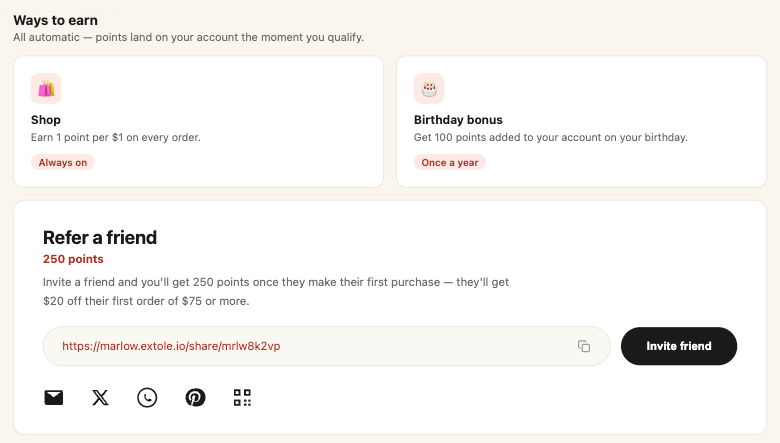
The same experience tells a member how to earn more. List the ways to earn alongside the balance
so a member who has just looked at what their points are worth can see what moves them closer to it.
Each way to earn is described in the member's own terms — what the action is, what it pays, and how
often it is available. Referrals sit in the same place: where the program rewards a referral, the
member's share link and share channels appear with the other ways to earn, so a single view covers
earning, referring, and redeeming. For the actions a program can reward and how each is configured,
see [Ways to Earn](/product/product-overview/programs/loyalty/ways-to-earn).
For the compliance obligations that apply to the data you collect, see
[GDPR and CCPA](/product/product-overview/security-and-compliance/gdpr-ccpa).
## How Extole Recognizes a Member
A loyalty balance belongs to a person, so the program depends on Extole resolving each participant
to the same profile every time. Pass your own identifier for the participant along with the events
you send, so activity from your site, your app, and your back-office systems lands on one profile.
Because a balance is valuable, the Reward Bank requires the participant to be a verified consumer
before it will show a balance or accept a redemption. Access from an email link is authenticated
with a JSON Web Token appended to the link. See
[Verifying Consumers](/technical/operational-tasks/security-and-compliance/verifying-consumers).
A participant who reaches the Reward Bank without being verified sees an empty bank rather than
their balance. Confirm the verification path works before launch, from both a logged-in page and
an email link.
## The Balance and Redemption Views
Members interact with their points in two places, and you choose which to use:
| View | Behavior |
| :- | :- |
| Redemption Center | Embeds into a page you already own, such as an account or rewards page. |
| Redemption Center Microsite | A standalone branded page, suitable for linking to from email. |
Within either, a member can see:
* **My Rewards** — the rewards they have earned and their current balance.
* **Redemption Options** — what the balance can be exchanged for at the current Redemption Ratio.
* **Redemption History** — a record of past redemptions.
* **Ways to Earn** — the actions that earn points, and the share link where the program rewards
referrals.
Members can redeem everything at once or select specific rewards, subject to the minimum and
maximum redemption values you configured.
You can also surface a balance outside the Redemption Center. Where you need a balance on your own
page or in your app, read it through the Reward Bank endpoints and render it yourself; see
[Points and Balances](/technical/platform-integrations/extensions/reward-bank/points-and-balances).
## Ways to Earn
The same experience tells a member how to earn more. List the ways to earn alongside the balance
so a member who has just looked at what their points are worth can see what moves them closer to it.
Each way to earn is described in the member's own terms — what the action is, what it pays, and how
often it is available. Referrals sit in the same place: where the program rewards a referral, the
member's share link and share channels appear with the other ways to earn, so a single view covers
earning, referring, and redeeming. For the actions a program can reward and how each is configured,
see [Ways to Earn](/product/product-overview/programs/loyalty/ways-to-earn).
 ## Status and Progress
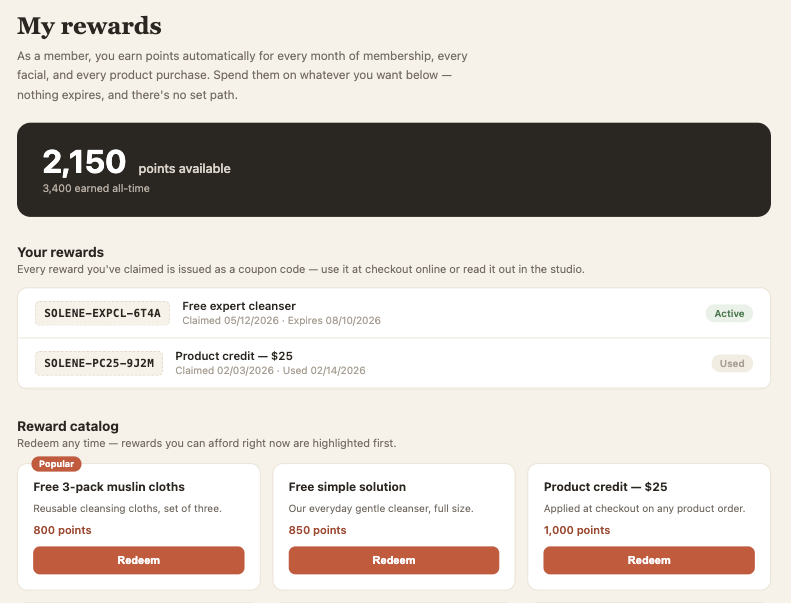
Extole provides a stats dashboard that shows a participant their activity and the rewards they have
earned. It can be displayed on your sharing landing page, embedded behind login on your own site,
or driven entirely by the APIs for a custom implementation. A loyalty dashboard leads with points
and the rewards a member holds; for the setup paths and the metrics a dashboard can show, see the
[dashboard setup guide](/guides/programs-and-campaigns/add-an-advocate-stats-dashboard).
## Status and Progress
Extole provides a stats dashboard that shows a participant their activity and the rewards they have
earned. It can be displayed on your sharing landing page, embedded behind login on your own site,
or driven entirely by the APIs for a custom implementation. A loyalty dashboard leads with points
and the rewards a member holds; for the setup paths and the metrics a dashboard can show, see the
[dashboard setup guide](/guides/programs-and-campaigns/add-an-advocate-stats-dashboard).
 For anything beyond what the dashboard shows — distance to a redemption threshold, a tier badge —
build it from data you already hold: the balance from the Reward Bank endpoints, and the tier
attribute from the participant's profile.
## Ongoing Touchpoints
The messages that keep a loyalty program alive are the recurring ones.
**Earned reward emails** confirm that an action produced points and link the member to the
Redemption Center. See the
[Earned Reward Emails Asset Guide](/guides/programs-and-campaigns/asset-guides/earned-reward-emails-asset-guide).
**Pending reward emails** tell a member that an action has been recognized but the reward is not
released yet, which matters where you hold rewards through a return window. See the
[Pending Reward Email Asset Guide](/guides/programs-and-campaigns/asset-guides/pending-reward-email-asset-guide).
**Redemption emails** confirm a redemption and deliver the reward, unless the reward provider
handles that message.
## Related
* [Loyalty](/product/product-overview/programs/loyalty)
* [Redemption and Reward Options](/product/product-overview/programs/loyalty/redemption-and-rewards)
* [Reward Bank Redemption Experience](/guides/programs-and-campaigns/reward-bank-redemption-experience)
* [Experiences](/product/product-overview/content/experiences)
## Related topics
- [Go-Live QA Checklist](/guides/platform-overview/go-live-qa-checklist.md)
- [Build a Loyalty Program](/technical/platform-integrations/extensions/reward-bank/loyalty-program-guide.md)
- [Testing Your Loyalty Program](/guides/strategy-and-best-practices/campaign-optimization/testing-your-loyalty-program.md)
- [Loyalty](/product/product-overview/programs/loyalty/index.md)
- [Choosing Your Point-to-Reward Ratio](/guides/strategy-and-best-practices/campaign-optimization/choosing-your-point-to-reward-ratio.md)
This documentation is built and hosted on [Mintlify](https://mintlify.com), a developer documentation platform.
For anything beyond what the dashboard shows — distance to a redemption threshold, a tier badge —
build it from data you already hold: the balance from the Reward Bank endpoints, and the tier
attribute from the participant's profile.
## Ongoing Touchpoints
The messages that keep a loyalty program alive are the recurring ones.
**Earned reward emails** confirm that an action produced points and link the member to the
Redemption Center. See the
[Earned Reward Emails Asset Guide](/guides/programs-and-campaigns/asset-guides/earned-reward-emails-asset-guide).
**Pending reward emails** tell a member that an action has been recognized but the reward is not
released yet, which matters where you hold rewards through a return window. See the
[Pending Reward Email Asset Guide](/guides/programs-and-campaigns/asset-guides/pending-reward-email-asset-guide).
**Redemption emails** confirm a redemption and deliver the reward, unless the reward provider
handles that message.
## Related
* [Loyalty](/product/product-overview/programs/loyalty)
* [Redemption and Reward Options](/product/product-overview/programs/loyalty/redemption-and-rewards)
* [Reward Bank Redemption Experience](/guides/programs-and-campaigns/reward-bank-redemption-experience)
* [Experiences](/product/product-overview/content/experiences)
## Related topics
- [Go-Live QA Checklist](/guides/platform-overview/go-live-qa-checklist.md)
- [Build a Loyalty Program](/technical/platform-integrations/extensions/reward-bank/loyalty-program-guide.md)
- [Testing Your Loyalty Program](/guides/strategy-and-best-practices/campaign-optimization/testing-your-loyalty-program.md)
- [Loyalty](/product/product-overview/programs/loyalty/index.md)
- [Choosing Your Point-to-Reward Ratio](/guides/strategy-and-best-practices/campaign-optimization/choosing-your-point-to-reward-ratio.md)
This documentation is built and hosted on [Mintlify](https://mintlify.com), a developer documentation platform.