> ## Documentation Index
> Fetch the complete documentation index at: https://docs.extole.com/llms.txt
> Use this file to discover all available pages before exploring further.
# How to Reward with Tango Gift Cards
> If your company provides a product or services where it doesn't make sense to reward your consumers with a coupon or other discount on the service you provide, you may want to thank them for sharing by giving them a gift card that can be us…
# Overview
If your company provides a product or services where it doesn't make sense to reward your consumers with a coupon or other discount on the service you provide, you may want to thank them for sharing by giving them a gift card that can be used at a major retailer or traded for cash. Extole supports the ability to enable a variety of gift cards and provide rewards to your consumers via our partner Tango Card.
# Reward Advocates with Gift Cards
Tango gift cards are managed in [Rewards section of your My Extole account](my.extole.com/account-rewards). Follow these steps to reward your consumers with gift cards:
## Creating the Gift Card Reward
1. Go to Rewards and hit + New Reward in the top right corner
2. Select US or International Gift Card
3. Choose the gift card you want to distribute and the value of that card
4. Fund your gift card balance via invoice from Extole
## Adding the Card to a Campaign
If your campaign is on Extole's upgraded Flow Builder, follow instructions to [Set Up a Reward](/guides/flow-campaigns/how-to-set-up-a-reward) or [Change a Reward on your Program](/guides/flow-campaigns/change-the-reward-on-your-program).
If you are on our legacy campaigns, rewards are updated either in the Overview or Rules tab of the campaign.
In the **Overview** tab, search for the Rewards section adjust the Advocate and Friend Reward Supplier Ids.
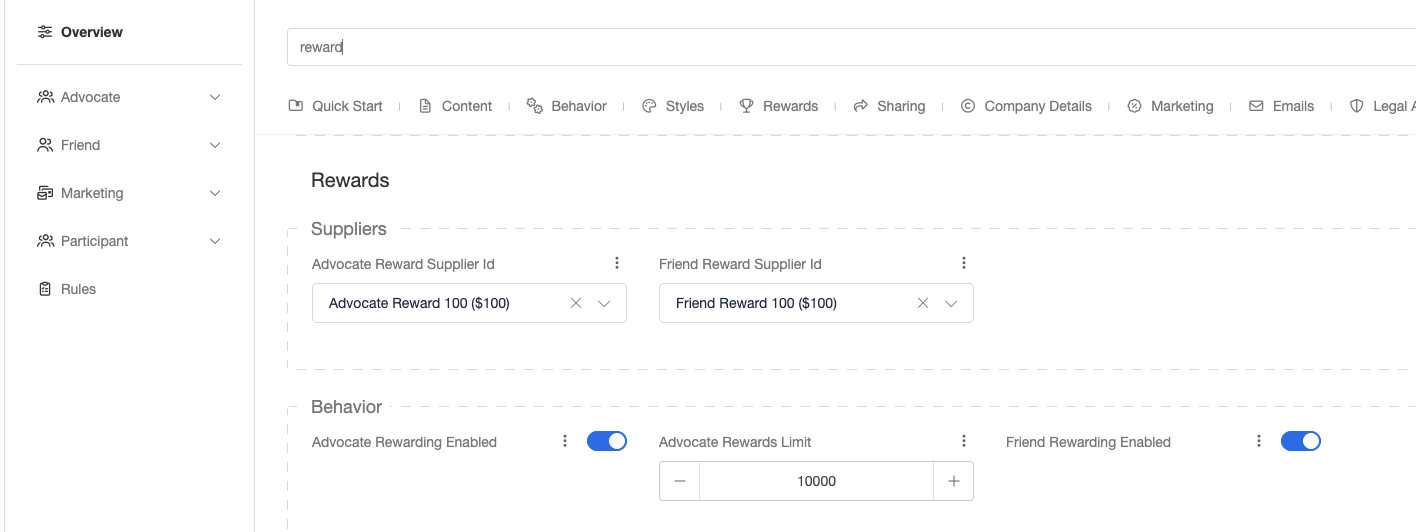 If you don't see this section, go to the **Rules** tab and search for the events in your program. Click the edit button to swap out the reward.
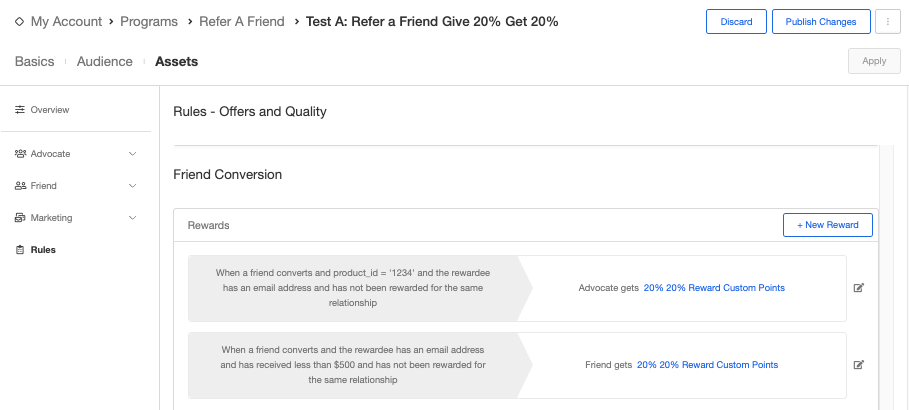 >
> If you are adding a Tango reward for the first time, you will also need to enable the Gift Card Configuration zone. This is where your CSM will enable the Tango template id.
# View Your Account Balance
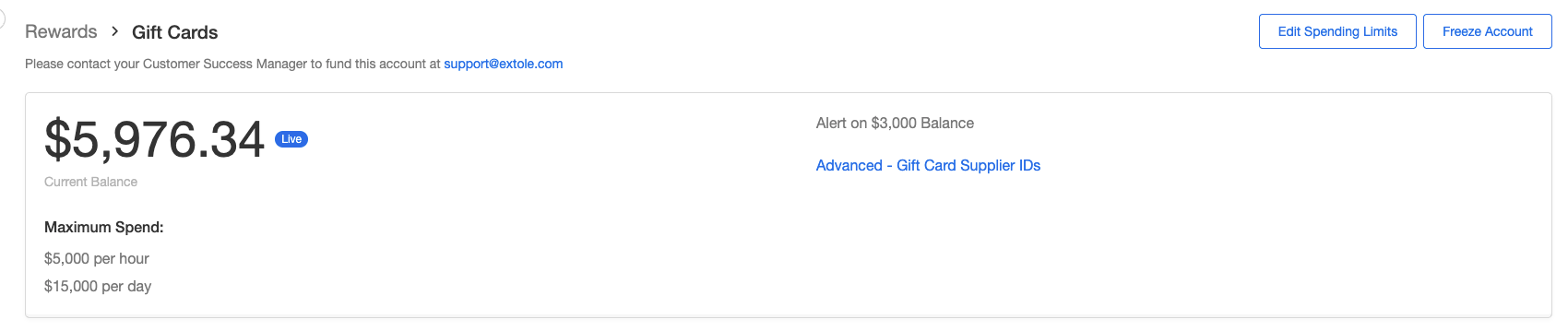
> Go to your [Rewards](my.extole.com/account-rewards)and click on [View Gift Cards](https://my.extole.com/account-rewards/gift-cards).
>
>
> If you are adding a Tango reward for the first time, you will also need to enable the Gift Card Configuration zone. This is where your CSM will enable the Tango template id.
# View Your Account Balance
> Go to your [Rewards](my.extole.com/account-rewards)and click on [View Gift Cards](https://my.extole.com/account-rewards/gift-cards).
>
 >
# Set Up Alerts
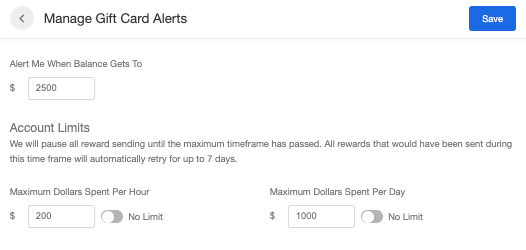
> You can set up warnings that alert you by email when your gift card balance is low or when a certain value of reward dollars are spent in a hour or day.
>
> To set up your alerts, go to your [Rewards](https://www.my.extole.com/account-rewards) -> [Gift Cards](https://my.extole.com/account-rewards/gift-cards) next to any of your configure gift card rewards. Click Edit Spending Limits in the top right corner and enter your alert amount.
>
# Set Up Alerts
> You can set up warnings that alert you by email when your gift card balance is low or when a certain value of reward dollars are spent in a hour or day.
>
> To set up your alerts, go to your [Rewards](https://www.my.extole.com/account-rewards) -> [Gift Cards](https://my.extole.com/account-rewards/gift-cards) next to any of your configure gift card rewards. Click Edit Spending Limits in the top right corner and enter your alert amount.
 >
# Fund Your Gift Card Balance
> Money is removed from your gift card balance each time a gift card is issued to an advocate. To keep your reward program flowing smoothly, you will need to fund and maintain an active balance in your account.
>
> Gift card funding is handled by Extole. When your account reaches the low balance amount, Extole will submit an invoice to replenish funds. Extole also supports credit card funding if that's preferred.
>
# Frequently Asked Questions
### Do Tango Gift Cards expire?
> Each gift card may have their own expiration date. The most common gift cards are Amazon.com (no expiration) and Visa / Mastercard (6 months). Any unredeemed funds are forfeited.
>
### Is there visibility into gift card redemption?
> Extole does not have insight into gift card redemption, but clients can implement our Reward Bank that supports pooling and redeeming rewards together. **[Learn more here](https://docs.extole.com/docs/reward-bank)** or consider using **[Tango Card's Promo Link](https://www.tangocard.com/reward-catalog?rewardcountries=US\&rewardcategory=reward+link)** functionality.
>
### Are there any additional costs on top of the value of the gift card?
> There are no additional fees on top of the value of the reward unless you choose the **[Promo Link](https://www.tangocard.com/reward-catalog?rewardcountries=US\&rewardcategory=reward+link)** [](https://www.tangocard.com/reward-catalog?rewardcountries=US\&rewardcategory=reward+link)reward type.
>
### Does Tango offer physical gift cards?
> Visa offers a physical gift card as an option. When a user is redeeming their reward, they can pay a \$3 fee to have the card mailed to them instead. Other than that, all rewards are digital gift cards.
>
### Can Tango Gift Cards be cancelled?
> Visa and Mastercard rewards may be cancelled if they were sent in error and haven't been redeemed. Amazon cards cannot be cancelled. There are fees associated with canceled cards. Reach out to [support@extole.com](mailto:support@extole.com) for this type of request.
>
> If the only issue is a wrong or mistyped recipient email, prefer resending the existing reward to the corrected address rather than cancelling. See [How to Resend Tango Rewards](/guides/rewards-management/reward-fulfillment/how-to-resend-tango-rewards).
>
### How quickly does an advocate receive their gift card?
> Gift cards are provided within minutes of qualifying for reward. If your conversion events are auto-approved, this could be instant. If you wait for a 30 day return period to pass before approving events, it would be 30 days after the event.
>
### What are the branding requirements if I choose to use a branded gift card?
> These are custom to each vendor, but the common requirements are:
* Your microsite zone must include the gift card disclaimer.
* Your terms and conditions must include a gift card disclaimer section.
* You sharing experience and mobile landing page must include in the header: "\*Restrictions Apply. See Terms."
* All emails to your consumers must include the gift card disclaimer.
> To view the disclaimer and branding requirements, go to your [Rewards](my.extole.com/account-rewards)and click on [View Gift Cards](https://my.extole.com/account-rewards/gift-cards).
>
# Fund Your Gift Card Balance
> Money is removed from your gift card balance each time a gift card is issued to an advocate. To keep your reward program flowing smoothly, you will need to fund and maintain an active balance in your account.
>
> Gift card funding is handled by Extole. When your account reaches the low balance amount, Extole will submit an invoice to replenish funds. Extole also supports credit card funding if that's preferred.
>
# Frequently Asked Questions
### Do Tango Gift Cards expire?
> Each gift card may have their own expiration date. The most common gift cards are Amazon.com (no expiration) and Visa / Mastercard (6 months). Any unredeemed funds are forfeited.
>
### Is there visibility into gift card redemption?
> Extole does not have insight into gift card redemption, but clients can implement our Reward Bank that supports pooling and redeeming rewards together. **[Learn more here](https://docs.extole.com/docs/reward-bank)** or consider using **[Tango Card's Promo Link](https://www.tangocard.com/reward-catalog?rewardcountries=US\&rewardcategory=reward+link)** functionality.
>
### Are there any additional costs on top of the value of the gift card?
> There are no additional fees on top of the value of the reward unless you choose the **[Promo Link](https://www.tangocard.com/reward-catalog?rewardcountries=US\&rewardcategory=reward+link)** [](https://www.tangocard.com/reward-catalog?rewardcountries=US\&rewardcategory=reward+link)reward type.
>
### Does Tango offer physical gift cards?
> Visa offers a physical gift card as an option. When a user is redeeming their reward, they can pay a \$3 fee to have the card mailed to them instead. Other than that, all rewards are digital gift cards.
>
### Can Tango Gift Cards be cancelled?
> Visa and Mastercard rewards may be cancelled if they were sent in error and haven't been redeemed. Amazon cards cannot be cancelled. There are fees associated with canceled cards. Reach out to [support@extole.com](mailto:support@extole.com) for this type of request.
>
> If the only issue is a wrong or mistyped recipient email, prefer resending the existing reward to the corrected address rather than cancelling. See [How to Resend Tango Rewards](/guides/rewards-management/reward-fulfillment/how-to-resend-tango-rewards).
>
### How quickly does an advocate receive their gift card?
> Gift cards are provided within minutes of qualifying for reward. If your conversion events are auto-approved, this could be instant. If you wait for a 30 day return period to pass before approving events, it would be 30 days after the event.
>
### What are the branding requirements if I choose to use a branded gift card?
> These are custom to each vendor, but the common requirements are:
* Your microsite zone must include the gift card disclaimer.
* Your terms and conditions must include a gift card disclaimer section.
* You sharing experience and mobile landing page must include in the header: "\*Restrictions Apply. See Terms."
* All emails to your consumers must include the gift card disclaimer.
> To view the disclaimer and branding requirements, go to your [Rewards](my.extole.com/account-rewards)and click on [View Gift Cards](https://my.extole.com/account-rewards/gift-cards).
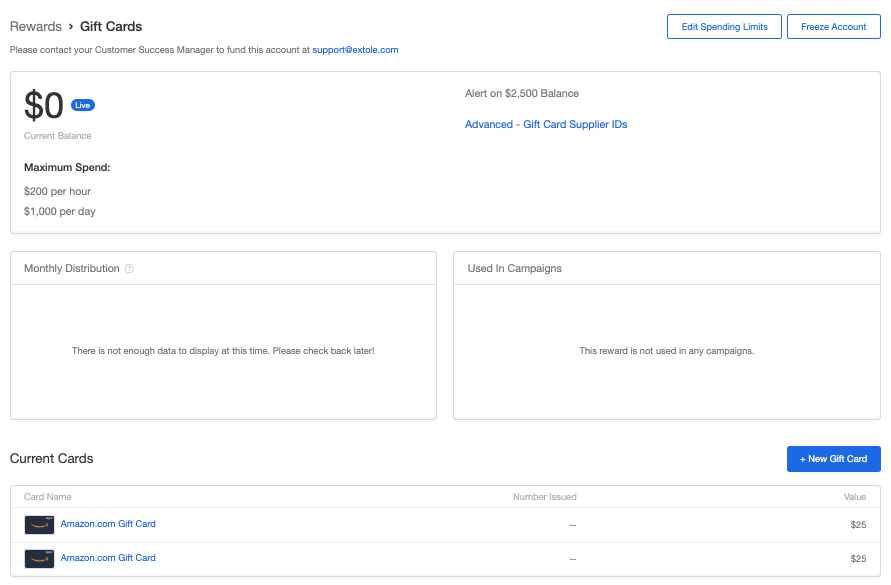 1. Under Current Cards, click on your desired card.
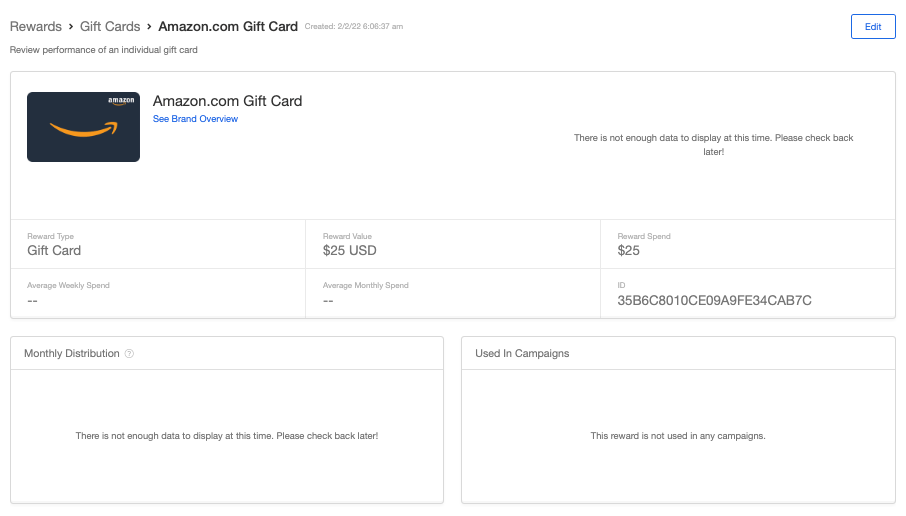 2. Hit the link to See Brand Overview and reference the provided information.
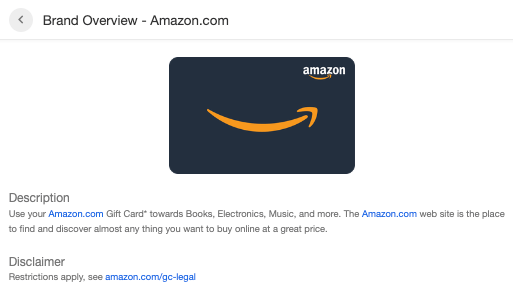 > If you are using the brand name of the gift card in your specific call-to-action or promotional emails, you will need to include the gift cards terms and conditions.
>
##
> If you are using the brand name of the gift card in your specific call-to-action or promotional emails, you will need to include the gift cards terms and conditions.
>
##