> ## Documentation Index
> Fetch the complete documentation index at: https://docs.extole.com/llms.txt
> Use this file to discover all available pages before exploring further.
# How can I Whitelist My Extole in uBlock Origin?
> The Ad Block Chrome Extension, uBlock Origin, has added extole.io into the list of sites that it blocks. This does not impact customer-facing programs, since these program run under a branded domain. Unfortunately, this does impact successf…
# Overview
The Ad Block Chrome Extension, uBlock Origin, has added extole.io into the list of sites that it blocks. This does not impact customer-facing programs, since these program run under a branded domain. Unfortunately, this does impact successful access to My Extole. In order to access My Extole, you will need to add extole.com and extole.io to the allowed list.
# How to Whitelist My Extole
uBlock Origin will show up in the list of Chrome Extensions on the upper right portion of your screen.
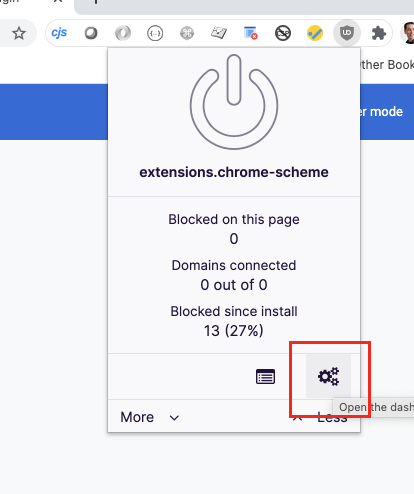
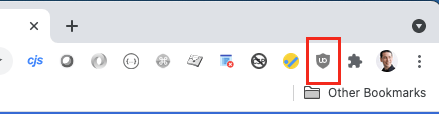 Click on the button for the uBlock Origin Chrome Extension and in the dialog that appears, click on the three gears icon.
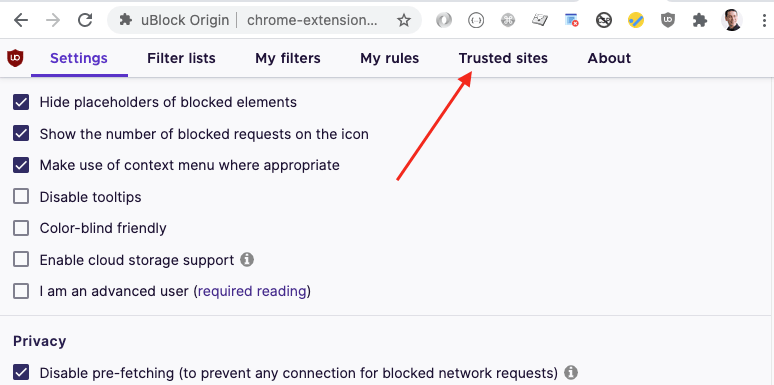
 This will open the uBlock Origin **Settings** page in Chrome. Inside of the settings page, you'll want to switch to the **Trusted Sites** tab.
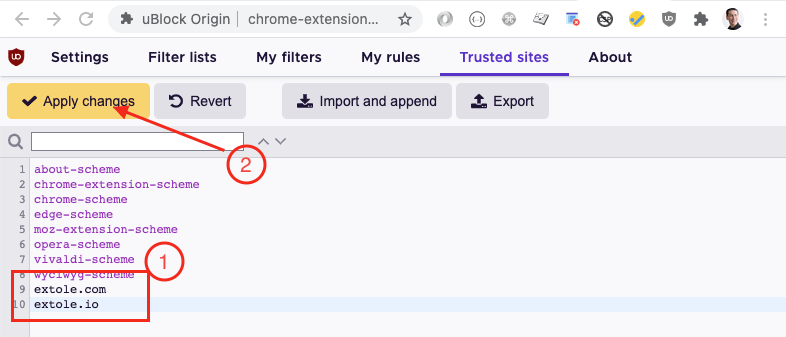
 In the **Trusted Sites** tab:
1. Add "extole.com" and "extole.io" as two additional trusted sites into the list
2. Click the "Apply Changes" button
In the **Trusted Sites** tab:
1. Add "extole.com" and "extole.io" as two additional trusted sites into the list
2. Click the "Apply Changes" button
 You can close the Settings tab and My Extole should work as expected.